By Smart Cam Guide
As an Amazon Associate I earn from qualifying purchases. Purchases through our links may earn us a commission at no extra cost to you.
A Blink Outdoor 4 temperature alert is not by itself proof that the camera has exceeded its hardware operating range. Check the chosen alert threshold and reported reading separately from the product rating. Calibrate an unexpected reading against a nearby thermometer before treating it as an accurate measurement of the entire property.
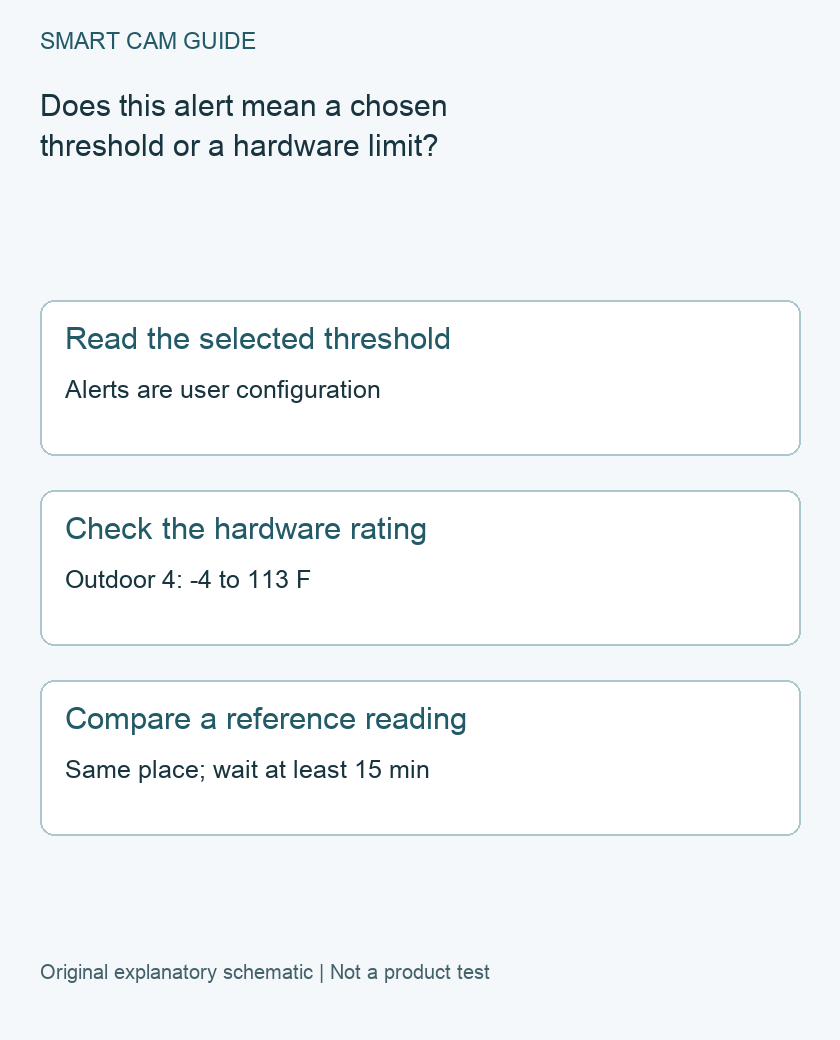
Keep three numbers separate
Blink lists Outdoor 4’s operating range as -4 to 113°F (-20 to 45°C). Its temperature-alert instructions instead limit the high alert setting to 90°F (32.2°C) and the low setting to 40°F (4.4°C). Those controls serve different purposes. A camera can cross a configured notification threshold while remaining within its published operating range.
For example, a 95°F reading is above a 90°F alert threshold but below the listed 113°F upper operating limit. That arithmetic example is not a test of camera performance at either temperature. Changing the threshold does not extend the product’s environmental rating.
Check the setting for this exact camera
Blink places Temperature in the camera’s General Settings, reached from Device Settings. Enable the alert and select the desired thresholds for each applicable camera. The support instructions exclude Mini, Mini 2 and Video Doorbell because they lack temperature sensors; do not expect an identical menu throughout a mixed Blink system.
Write down the camera name, app version, displayed units, reported temperature and both thresholds. In a multiple-camera system, verify that you opened the device which produced the notification. Keep the message time as well as the time you viewed the status; they need not be the same observation.
Calibrate a reading that looks wrong
Blink’s procedure is to place the camera near a thermometer, wait at least 15 minutes and adjust the Camera Temperature calibration with the plus or minus controls. Its unit setting is under Device and System Settings. Compare like units before applying an adjustment.
Our worksheet adds a simple record: write down both readings before adjustment, the location, time and result afterward. A weather app for a different location is not the same comparison as a thermometer beside the camera. If reaching the installed camera is unsafe, arrange help rather than calibrating from an unrelated reference.
Do not use calibration to hide a real exposure problem
A calibration adjustment aligns a reading with a reference; it does not make an unsuitable installation suitable. If the environment exceeds the camera’s specification, follow the manufacturer’s guidance rather than adjusting the displayed number to suppress alerts. Keep the original reading in the support record.
If you temporarily relocate the camera for the comparison, review the intended view and signal when putting it back. Blink’s Device Settings guidance recommends checking network and Sync Module strength after moving equipment. Also confirm the household’s intended arming state and make one ordinary, consenting recording check. The temperature exercise should not silently leave a coverage gap.
A compact alert log
- Identity: exact camera and current app/firmware information.
- Configuration: units, high/low thresholds and whether temperature alerts are enabled.
- Observation: message time, displayed reading and nearby thermometer result.
- Change: calibration before/after, relocation and subsequent behavior.
If alerts remain inconsistent, send that record to Blink rather than repeatedly changing thresholds and batteries together. Our separate Outdoor 4 power guide covers battery and USB-C distinctions; a temperature notification alone does not establish a battery fault.
When a different sensor is the better requirement
If you need dependable freezing, food-storage or animal-care alarms, define the required accuracy, notification reliability and failure behavior before buying equipment. This camera guide provides no validated accuracy tolerance or alarm-delivery guarantee. We have not tested Outdoor 4 as a weather station or a safety monitoring device. Use purpose-appropriate monitoring instead of assuming a camera setting meets a critical requirement.
Buying option: match the exact product
This is a system-purchase option only if you need both an Outdoor 4 view and the included doorbell. It is not a thermometer, an add-on-only camera or a temperature-alert repair. Sync Module Core does not provide local storage; review the eligible cloud plan and exact selected contents. The current destination identifies Video Doorbell, not a verified 2K+ doorbell; confirm the exact selected generation and package before ordering.
Blink Video Doorbell + Outdoor 4 + Sync Module Core bundle
Check Blink Video Doorbell + Outdoor 4 + Sync Module Core bundle details on Amazon
Product link and model mapping reviewed November 4, 2026. Check the selected model, package, seller and current offer before ordering. No live price, stock or delivery is asserted.
Related guides
- Blink Outdoor 4 Batteries: USB-C Power Is Not a Charging Plan
- Blink Outdoor 4 Add-on or Kit? Check the Sync Module
- Blink Cameras on Separate Schedules: One System or Two?
Sources and research scope
Reviewed October 29, 2026. Blink How to enable Temperature Alerts, US support; Blink Outdoor 4 Technical Specifications; Blink Device Settings. This is document-based guidance by Smart Cam Guide. The decision worksheet and proposed owner checks are editorial recommendations, not hands-on test results. Exact model, hardware revision and current instructions govern where details differ.