By Smart Cam Guide. Document-based buying guidance; checked September 20, 2026. We have not hands-on tested these products.
Affiliate disclosure: As an Amazon Associate I earn from qualifying purchases.
A Blink Outdoor 4 add-on camera is for expanding a system that already has a compatible Sync Module. If this is your first Outdoor 4, buy a package with the module included or arrange a compatible module separately. A bundle can solve the missing-module problem while still leaving a different question unanswered: how will you save clips?
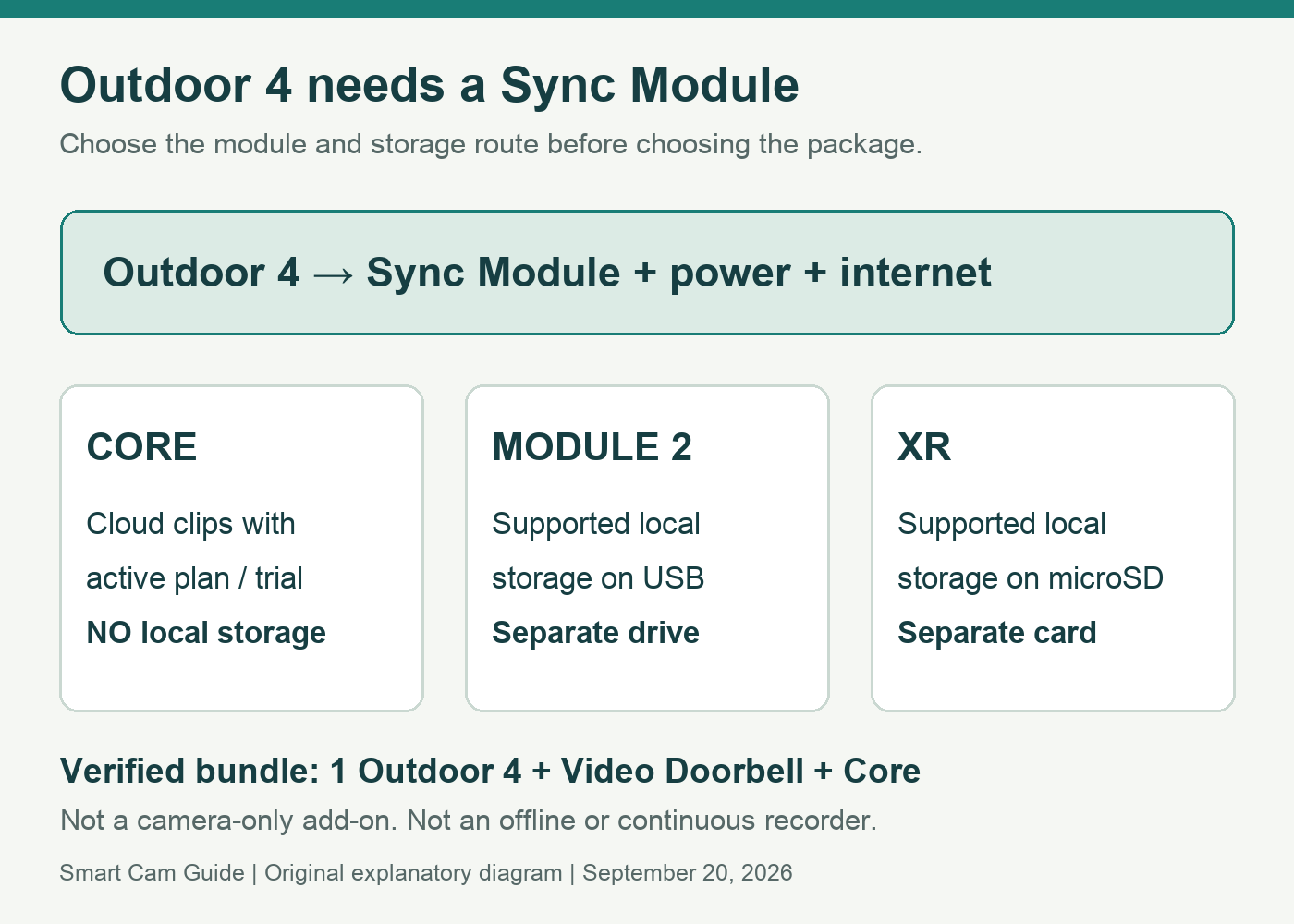
That second question matters when the box includes Sync Module Core. Core does not support local storage or clip backup. Do not buy a Core bundle expecting to plug in a USB drive later.
Read the package name before the camera count
“Add-on camera” normally means the Sync Module is not in that package. Blink’s Outdoor 4 FAQ says a Sync Module is required and that Outdoor 4 is compatible with Blink Sync Modules. Compatibility gets the camera into a system; it does not make every module’s storage features identical.
Our verified shopping link below is a specific one Outdoor 4 camera + Video Doorbell + Sync Module Core bundle. It is not a camera-only add-on or a two-Outdoor-camera pack. Consider it if you want both an outdoor camera and a doorbell and are comfortable with the Core storage limitation.
View Outdoor 4 + Doorbell + Core on Amazon
If you only need another camera for an existing system, compare an add-on instead of paying for an extra doorbell you will not use. Recheck the selected box contents whenever Amazon changes the displayed bundle.
Choose storage before choosing the kit
- Sync Module Core: use an active Blink subscription or applicable trial for cloud clip storage. Core has no local-storage or clip-backup support.
- Sync Module 2: supports local storage for compatible cameras using a suitable USB drive.
- Sync Module XR: supports local storage for compatible cameras using suitable microSD media; the reviewed Blink documentation describes its US/Canada availability.
Local storage and a cloud subscription’s clip backup are different workflows. Check the current Blink storage instructions for your exact module, camera and plan before buying media. A drive or card by itself does not create a recording plan, and Core cannot gain local storage from one.
Our Blink Mini 2K+ storage guide addresses a different camera family. Do not transfer its module-optional setup assumptions to Outdoor 4.
A first-system buying worksheet
Check the complete system before buying. Download the free, one-page Camera Recording Checklist (fillable PDF). Record the exact camera, module, storage route and continuing costs, then keep the result of your own saved-clip playback check. A connected live view alone is not proof of recording.
- List what you already own. Write down the actual module model from your current system. A camera in the Blink app does not, by itself, prove you have the module needed for this purchase.
- Count only devices you need. Separate Outdoor cameras from doorbells, mounts and modules when comparing bundles.
- Choose how to retrieve yesterday’s event. Decide on supported local storage or cloud recording. Budget the required module, media or continuing plan as applicable.
- Plan indoor power for the module. The camera’s battery operation does not remove the module’s power or network requirements.
- Check the final selected package. Match model, camera count and module name in the box list before paying.
Setup order prevents an avoidable failure
Add the Sync Module to the Blink system before adding Outdoor 4. Blink’s troubleshooting guide identifies a missing Sync Module as a cause of the dependent-device error during camera setup. If the error appears, first verify which system you are adding the camera to and whether its module is actually online.
Set up and test the camera near your intended mounting position before drilling. Confirm Live View, an intentional motion event and retrieval of the saved clip using your chosen storage route. A successful live picture answers only the first of those checks.
After any trial ends, repeat the saved-clip check. Write down the result for the actual plan and module you kept. This makes a recording gap visible before you depend on footage from a real incident.
When Outdoor 4 is the wrong kind of camera
Outdoor 4 is an internet-connected, event-oriented camera, not a continuous-recording or no-internet substitute. Blink’s battery-life estimate is conditional, so do not treat it as a maintenance schedule for a busy doorway. If you need to review a continuous timeline, start with a camera designed for that job; our Wyze Cam v4 recording guide explains one different approach and its power requirements.
Also plan the view itself. Putting an indoor camera behind glass is not an equivalent shortcut for outdoor coverage; see the window reflection guide for that limitation.
Our conditional recommendation
The verified Outdoor 4 + Doorbell + Core bundle makes sense for a first Blink system needing both views and accepting a cloud clip-storage plan. For someone already equipped with a compatible module, or someone specifically seeking local storage, start with those requirements and compare the appropriate package instead. The cheapest-looking box is not necessarily the lowest-cost working system.
Check the exact Doorbell + Outdoor 4 bundle
Research basis: Blink Outdoor 4 FAQ, Sync Module Core FAQ, Outdoor 4 troubleshooting and storage documentation; US Amazon package inspection on September 20, 2026. No range, battery-life or recording test was performed.
Check the camera model before choosing the bundle
Our Outdoor 2K+ versus Outdoor 4 comparison separates the resolution upgrade from Extended Range compatibility. If reach is the reason for buying Outdoor 4, use the XR and XR+ module guide; the Core bundle on this page does not include that range capability.
Check the gap between Outdoor 4 clips
Before choosing an Outdoor 4 bundle for a busy entrance, understand Outdoor 4 retrigger time and clip length. The camera waits after each motion clip, and events inside that interval are not recorded. Buying a different bundle or module does not turn Outdoor 4 into a continuous-recording camera.
If the package is intended for cameras with different daily routines, plan the groups before buying another module. Our Blink separate arming schedules guide explains how camera motion settings, systems and Sync Modules fit together, including what to recheck before moving a camera.