As an Amazon Associate I earn from qualifying purchases. Purchases through our links may earn us a commission at no extra cost to you.
A Tapo detection zone tells supported detection features where to look for events; a privacy zone obscures part of the image. Do not use a detection boundary as proof that everything outside it is hidden or absent from a recording. Your recording mode and microphone settings are separate checks.
We use the Tapo C120 as the buying example and follow current Tapo/TP-Link documentation checked September 17, 2026. Menus and detector options can vary with model and firmware. The practical goal is to save useful footage while keeping the visible scene within your intended monitoring area—not merely to reduce the number of alerts on a phone.
Start with the result you want
| Goal | Relevant control | Important limit |
|---|---|---|
| Reduce events from an unimportant part of the view | Detection zone for the applicable detector. | A detection boundary is not a blacked-out image area. |
| Hide a specific visible area | Privacy zone / visual mask. | Check the resulting saved view; do not assume it mutes audio. |
| Stop phone notifications at a certain time | Notification or schedule settings. | Recording may continue under a separate mode. |
| Keep continuous video history | Recording and storage configuration. | Event zones do not substitute for retention and playback checks. |
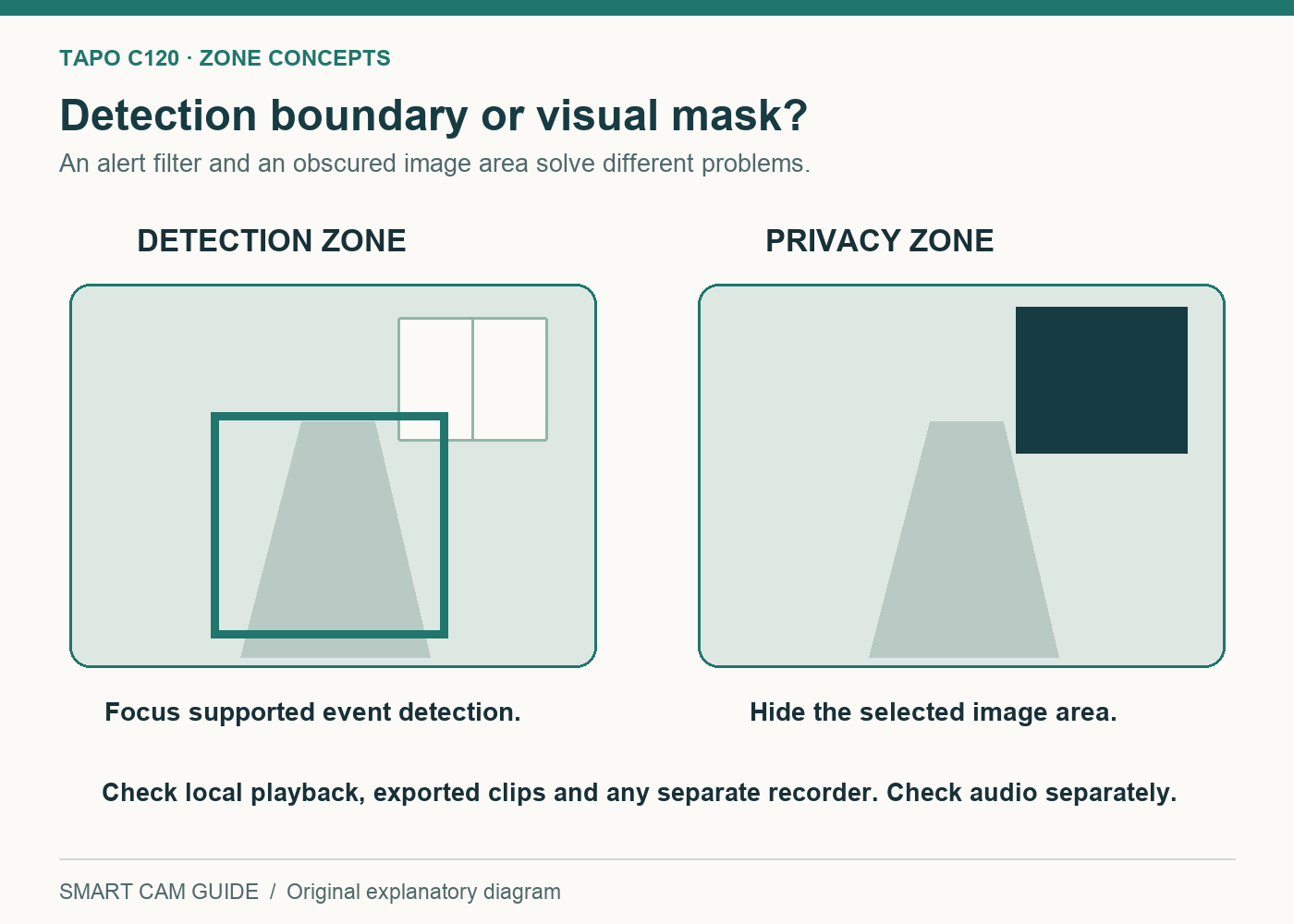
For example, you might want events when someone approaches your door, fewer events from movement beyond the path and a neighboring window obscured. One large detection zone does not accomplish all three. First choose a sensible camera angle, then configure detection for the approach and a visual mask for any area that should not be visible.
Start with placement because software controls cannot recover a useful view that the lens never captures. Nor should a small mask be used to justify pointing the camera at an unnecessarily broad private area. Keep the monitored scene proportionate to the purpose.
Detection settings can differ by detector
Tapo’s current guidance describes Detection Zones under the camera’s detection settings. Depending on the model and firmware, the interface can offer a shared zone or separate zones for individual detection types. Check the setting for the detector you actually enable rather than assuming one outline governs every possible event.
For a C120, confirm the current firmware and available person, pet, vehicle or motion options in the app. Names and combinations can change. Begin with the types you need and test them individually; enabling everything at maximum sensitivity can make it harder to learn which setting creates an unwanted event.
Give the approach path some practical margin. A boundary drawn extremely tightly around a doorway may exclude a useful part of a person’s approach, while a broad boundary may include traffic or moving foliage. Adjust using saved clips from the actual scene instead of treating a neatly drawn rectangle as a finished setup.
Tapo C120 — check the exact one-camera variant
Check price on AmazonPrivacy zones need a separate check
TP-Link’s privacy-zone instructions, which include the C120, place the feature under Video & Display → Privacy Zones and describe up to four zones. Use the current interface for your device. The important test is whether the intended area is actually obscured in the output you use.
A mask relates to the camera’s current view. If you move or remount the camera, revisit the mask immediately: a shape that covered one window can cover something else after the angle changes. Include privacy settings in any placement change, even if the camera reconnects normally.
Check audio independently. Masking a window in a picture is not a reason to assume the microphone is off. Decide whether audio is needed and confirm the relevant microphone and recording settings. We do not claim that a visual privacy zone provides an audio boundary.
An event boundary is not a recording crop
If the camera is configured for continuous local recording, a change in event detection should not be treated as an instruction to crop the stored image. Inspect the timeline and replay an interval without an alert. The absence of a notification does not establish that no video exists.
Likewise, a useful app preview is only one output. You may view local card playback, a downloaded clip or a separate recorder. Verify the privacy result on each route you actually use. This guide has not tested whether every firmware and third-party RTSP/NAS combination reproduces masks identically, so we do not promise that it does.
Our Tapo C120 RTSP and NAS guide covers that separate recorder workflow. Test a non-sensitive scene before relying on a new destination. If an output exposes an area you intended to hide, stop using that route for the intended scene until its behavior is understood.
A repeatable walk test
- Record the camera angle, enabled detectors, zone boundaries, audio state and recording mode.
- With a household member’s cooperation, walk along the desired approach at ordinary speed.
- Check whether the expected event and saved footage are present.
- Walk through an unimportant area outside the detection zone, without entering anyone else’s private space.
- Distinguish an unwanted event from ordinary continuous footage; they are different results.
- Inspect the masked area in Live View, local playback and a downloaded test clip.
- If you use a NAS or another recorder, inspect that saved output too.
- Repeat after dark and after any camera-angle change. Alter one relevant setting at a time.
Keep a short note of what failed. “Alert outside the zone” could mean the wrong detector’s boundary, a different event type or a setting that did not save. “Visible area in footage” concerns privacy masking or the output route. Describing the symptom precisely is more useful than turning every sensitivity control down.
Who should buy the C120 for this job?
Shortlist it when its documented controls and the planned camera placement match your needs, and you are willing to verify your own recording workflow. Do not buy it on the assumption that drawing one zone disables every unwanted view, sound and event. The controls are useful because they are distinct, provided you configure and test the right ones.
Also budget for the chosen storage. A detection setting does not supply a memory card or a recorder. Our high-endurance microSD buying guide separates compatibility, recording life and retention capacity.
Tapo C120 — confirm camera, power and storage requirements
Check price on AmazonSources: TP-Link privacy-zone FAQ; Tapo detection-zone guidance; Tapo C120 US specifications and TP-Link detection troubleshooting. Checked September 17, 2026. Diagrams are explanatory concepts. No model-independent detector behavior, audio masking or untested third-party recording-path guarantee is implied.