As an Amazon Associate I earn from qualifying purchases. Purchases through our links may earn us a commission at no extra cost to you.
The Ring Floodlight Cam Wired Plus is a reasonable driveway candidate when you want motion-activated lighting and a camera at a suitable powered location. Its strongest fit is a near-home area with good Wi-Fi and a practical installation point. A bright floodlight is not a substitute for placing the camera close enough to capture useful detail.
This guide covers the white US Wired Plus model linked below: 1080p video, not a similarly named Pro or newer higher-resolution model. We checked the selected Amazon variant and Ring’s specifications and light-setting instructions on September 17, 2026. We have not installed this unit or measured recognition distance.
Light, motion sensing and recognizable detail are different
Ring specifies 2000-lumen floodlights and a 140° horizontal camera field of view for this model. Its light-motion sensing area is broader: Ring describes 270° light zones. That is why a light can respond to activity outside the area you expected to see in the camera’s recording.
Those numbers do not describe the distance at which a moving face or license plate will be readable. Field of view tells you the angular width of a scene. Luminous output describes light, not pixels on a distant subject. Motion detection tells you something triggered a sensor or setting. Useful evidence depends on all of those plus distance, angle, weather and movement.
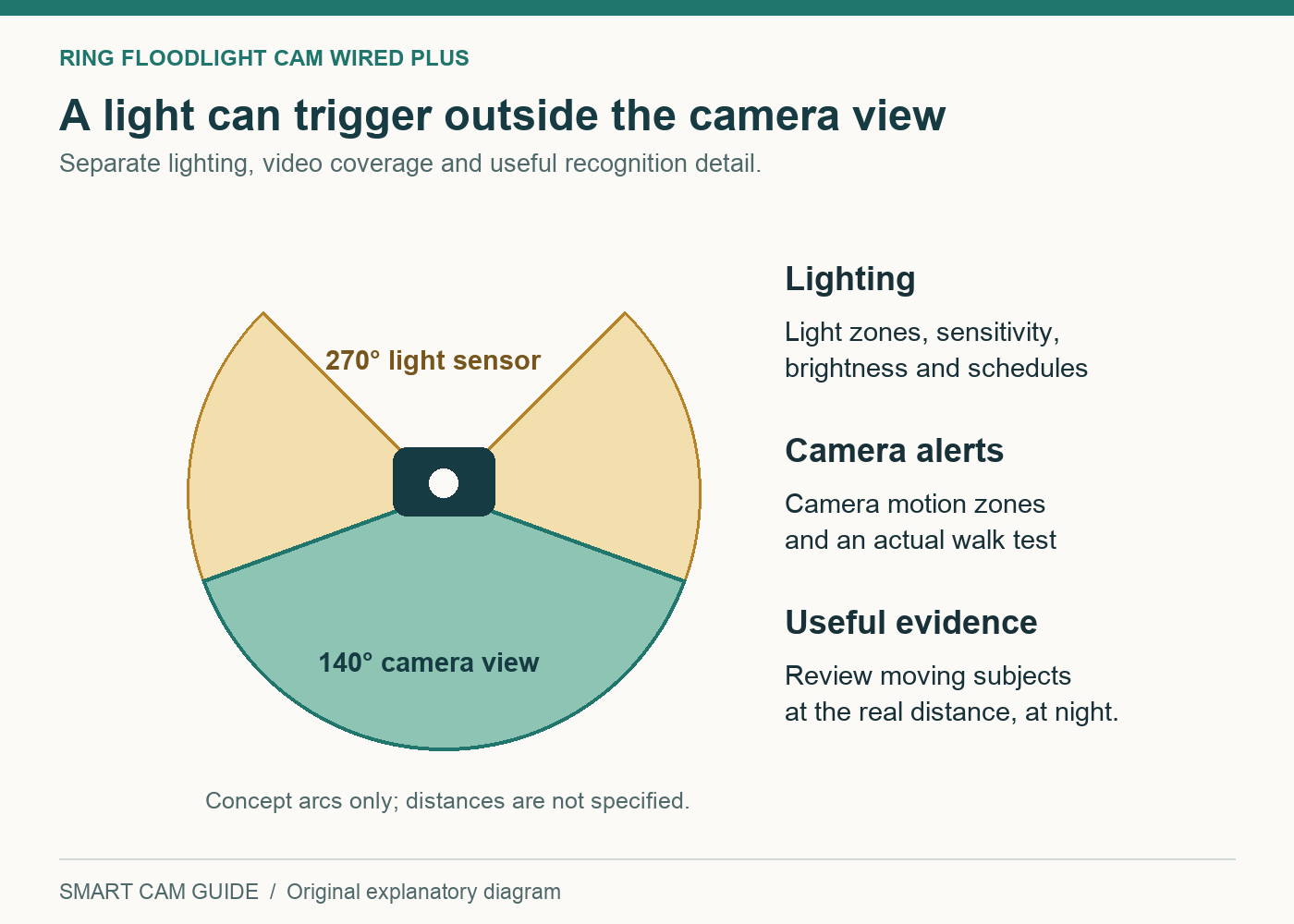
| What you want | What to check |
|---|---|
| A light when someone approaches | Light-motion zones, sensitivity, darkness conditions and where the lamps point. |
| A useful notification | Camera motion zones and the actual path people take through the scene. |
| Footage that identifies what happened | Playback detail at the relevant distance, at night and with a moving subject. |
| A saved clip after a missed alert | An eligible recording subscription and a verified recording history, not live view alone. |
Ring Floodlight Cam Wired Plus — white, wired single camera
Check price on AmazonThe existing light fitting may not be the best camera position
An old floodlight may illuminate a driveway well while giving a camera an unhelpful downward view of heads or a view obstructed by a garage roof. Before treating it as the obvious installation point, stand back and map the area you actually need to observe.
Mark three things on a sketch: where someone first enters the driveway, where they pass closest to the building and where the important interaction happens, such as a car door or package drop. Then note the parts hidden by a parked SUV, a gate or landscaping. The best view of a delivery may be different from the widest view of the whole driveway.
A very high position may reduce tampering opportunities but can reduce useful facial detail. A very wide view can show that a person was present without showing enough detail to identify them. We do not prescribe a universal mounting height here; follow Ring’s installation guidance for the device and validate the actual view.
If you primarily need to monitor a distant gate or a long approach beyond reliable home Wi-Fi, use our long-driveway and remote-gate guide first. This wired Wi-Fi model is not a cellular camera, and its lights do not extend the network.
Have power and the mounting arrangement checked
The linked version is intended for a compatible hardwired supply. Have a qualified installer assess the existing junction box, mounting surface, weather exposure and wiring before ordering around a presumed easy swap. Include any required electrical work in the quote. This article does not provide wiring instructions.
Continuous power also depends on how the circuit is used. If someone habitually turns off a wall switch feeding the location, the camera may lose power with the lights. Ask the installer to explain how the completed installation should be operated. Avoid solving that issue with improvised wiring or an incompatible control.
The camera uses 2.4 GHz Wi-Fi. Check signal and a usable live stream at the intended location, with garage doors in their normal positions and the household network operating. A phone showing some Wi-Fi bars near the garage is a preliminary clue, not a recording-reliability test.
Tune the light and camera settings separately
Ring’s Light Settings include controls for motion-activated lights, light zones, sensitivity, brightness and schedules. Camera motion zones serve a different purpose. Start with the area you own and need to monitor; avoid unnecessarily illuminating a neighbor’s windows or including irrelevant street activity.
Use a controlled walk test after dark. Have an authorized household member follow the driveway approach while you observe three outcomes: the light, the notification and the saved clip if recording is enabled. If only the light activates, do not immediately conclude that the camera has failed. The broader light zone may explain the difference.
When lights activate too often, review light-zone coverage and sensitivity, schedules and linked-device behavior. When notifications are excessive, review the camera’s motion zones and relevant notification settings. Change one variable at a time and repeat the same walking route. Randomly changing several settings makes it harder to know what improved the result.
Do not point lamps into the camera lens or a nearby reflective surface merely to maximize apparent brightness. Review the nighttime recording for glare and washed-out close subjects. The goal is useful illumination of the approach, not the brightest patch in the live-view image.
Pay for the outcome you need after an event
Without a compatible Ring recording subscription, live viewing and real-time interaction should not be confused with an archive you can open the next morning. Ring’s current product information distinguishes those functions from saving and reviewing recorded video. Verify the available plan for your region and this exact device.
Also do not infer continuous 24/7 recording from continuous mains power. Plan eligibility and device support determine the recording features available. If uninterrupted archival recording is the central requirement, confirm it explicitly before buying. For an independent local-recorder approach, see our NAS/ONVIF planning guide, which covers a different type of system.
| Budget item | Reason it matters |
|---|---|
| Camera | Match the Wired Plus name, color and package; do not compare a bundle price with one unit. |
| Installation | A sound existing location may be straightforward; moving power or correcting the mounting arrangement changes the cost. |
| Recording service | Include the recurring cost of the compatible plan you actually need. |
| Network improvements | Allow for better coverage if the final camera location does not have a dependable link. |
| Coverage gaps | A second viewpoint may be needed around an obstruction; extra lumens cannot see around it. |
A practical acceptance test for your driveway
- Walk toward, across and away from the camera. Check the route a visitor would actually use.
- Repeat with a vehicle parked normally. Look for the blind spot it creates near doors and packages.
- Test after dark. Compare infrared/color behavior, glare and lamp direction in real conditions.
- Retrieve a specific earlier event. Confirm the plan, recording and playback work even when you did not open the alert.
- Inspect useful detail at the farthest relevant point. Do not rely on a close-up test beside the camera.
- Recheck unwanted activation. Observe traffic, pets or moving foliage and adjust only what the evidence supports.
A home camera can support awareness and documentation; it does not guarantee prevention or identification. Keep the recommendation tied to the useful image and recordings you can actually verify.
Common questions
Why do the lights come on without a matching camera event?
The light-motion zone can cover a broader area than the camera view or configured camera motion zones. Review light settings, schedules and linked devices before treating the behavior as a fault.
Will 2000 lumens read plates at the road?
That specification does not establish plate recognition. Distance, exposure, motion and angle matter. We have no measured plate-recognition result for this model and would not buy it on that assumption.
Is the wired version useful without Wi-Fi?
It is not an off-grid cellular recording recommendation. Plan around a reliable 2.4 GHz Wi-Fi connection and the selected Ring service features.
Our recommendation
Choose the Wired Plus for a well-positioned near-home driveway view where integrated lighting and Ring’s app workflow are useful. Pass when the mounting location gives the wrong view, the network cannot reach it, or your core need is verified distant identification or a local continuous archive. Resolve those requirements before comparing floodlight brightness.
Ring Floodlight Cam Wired Plus — confirm White / Wired Plus
Check price on AmazonResearch notes: Ring US Floodlight Cam Plus/Wired Plus specifications, Ring “Using light settings for Ring security cameras,” and the selected US Wired Plus listing. Checked September 17, 2026. No measured range, face/plate recognition or electrical installation result is claimed.
If you are considering a smaller Ring camera elsewhere on the property, our Outdoor Cam Battery 24/7 recording guide separates motion clips from continuous recording, and explains the continuous power and subscription requirements for the linked 1080p model.
Before paying for a different floodlight camera, compare Ring Floodlight Wired Plus and Wired Pro. The Pro model adds radar-based motion tools, but neither camera can solve an obstructed view simply by changing detection settings.
If the preferred camera position has no suitable wiring, compare Blink Outdoor 4 Floodlight with Ring Wired Plus. The battery option introduces two separate battery supplies and different recording costs; it is not just the same floodlight without a wire.
If a camera records when its own view appears still, trace the source and direction of Ring Linked Events before changing local motion sensitivity. The camera that starts a rule and the camera that records can be different devices.