🚨 Most People Think Their Parked Car Is Safe — Until Something Actually Happens
You park your car. Lock it. Walk away. Everything feels fine — until the next morning.
🚗 A scratch you don’t remember getting
📦 Something missing from inside the car
🚶 Or worse — no idea what actually happened
This is the moment most people realize something uncomfortable:
👉 Having a camera is NOT the same as actually monitoring your car
An overnight or public-parking setup must be checked against its intended outcome:
- ❌ Dash cams stop recording or don’t notify you
- ❌ WiFi cameras can remain remotely accessible after you leave if their network stays connected
- ❌ Battery cameras miss events or trigger too late
So the real question isn’t:
“Do I have a camera?”
It’s:
👉 How do I actually monitor my car when I’m not there?
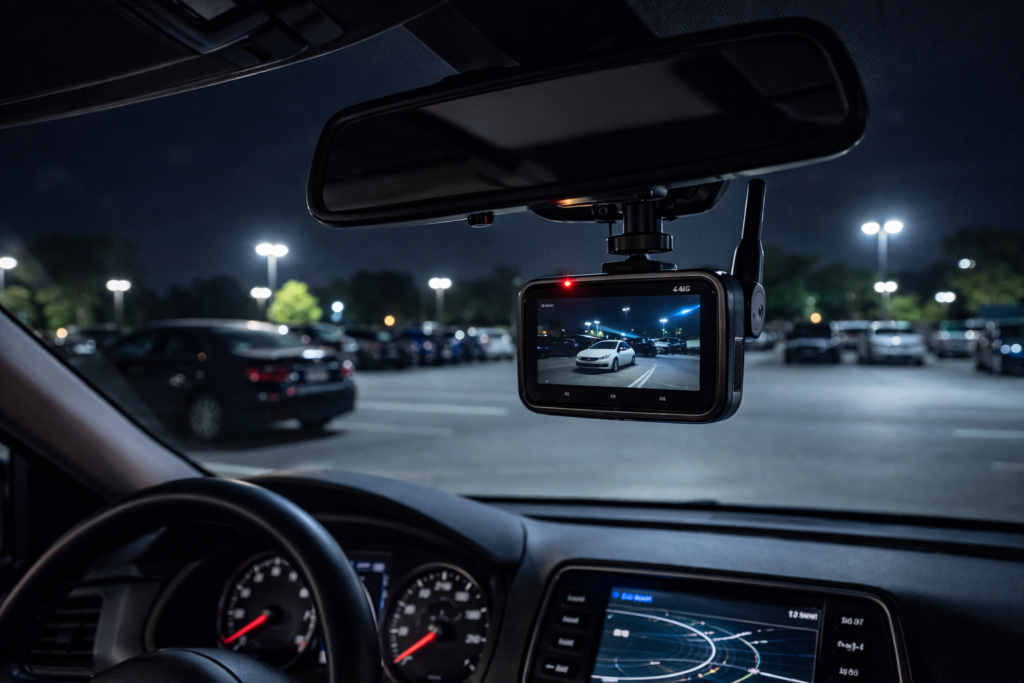
This guide compares documented setup requirements; we have not physically tested these camera systems.
💡 There is no single “best camera”
Only solutions that work — depending on where and how your car is parked.
👉 Each option has limits that should be tested at the parking location
In this guide, we’ll break down:
- ✔ What actually works (and what doesn’t)
- ✔ Real solutions for different parking scenarios
- ✔ How to monitor your car without WiFi
💡 The Truth About Monitoring a Parked Car
👉 There is NO single “best camera” — only setups that actually work in real situations.
Most people choose based on specs, price, or brand. For a parking installation, evaluate those factors together with these requirements:
- ✔ Whether the camera can stay connected when you’re away
- ✔ Whether it can send alerts in real time
- ✔ Whether it captures what happens outside the car
👉 A failed remote feature does not necessarily stop local recording; check each required outcome separately.
⚠️ Limits to Check in Common Setups
- ❌ Basic dash cams may record locally without remote alerts; connected models differ
- ❌ WiFi cameras can support remote access through an internet-connected router
- ❌ Battery cameras exist — but often miss critical moments
👉 Match the setup to saved evidence, remote awareness or both
✅ What Actually Works
A system that can:
- ✔ Stay connected without relying on WiFi
- ✔ Test notifications with the actual camera and phone connections
- ✔ Capture events around your parked car — not just inside it
👉 That’s the difference between “having footage” and actually protecting your car
So before choosing any device, you need to understand one thing:
👉 What options actually exist — and which ones work in real life?
🔍 All Ways to Monitor a Parked Car — What Actually Works (and What Doesn’t)
Before choosing any setup, you need to understand one thing:
👉 Not all “car cameras” are designed for real monitoring
Here are the documented features to verify for each type; this is not a physical comparison test:
1. Dash Cam (Most Common — But Limited)
Dash cams are designed for driving — not for monitoring a parked car.
- ✔ Records footage while powered
- ❌ Remote alerts require exact-model support and a network path
- ❌ You only see footage after something happens
- ❌ Often stops recording when parked (battery/power limits)
→ Do Dash Cams Drain Car Battery Overnight?
2. WiFi Security Cameras (Check Site Network Coverage)
WiFi cameras work well indoors — but completely break down when used for cars.
- ✔ Good for home environments
- ❌ Check whether the camera’s network remains available after you leave WiFi range
- ❌ Remote access requires exact-model support and a network path in parking lots or streets
- ❌ Alerts fail if network drops
→ Do Security Cameras Work Without WiFi?
3. Battery-Powered Cameras (Convenient — But Inconsistent)
Battery cameras sound ideal — but real usage tells a different story.
- ✔ Easy to install
- ✔ No wiring needed
- ❌ Sleep mode may delay recording
- ❌ Misses short or fast events
- ❌ Limited runtime for overnight monitoring
4. 4G / Cellular Cameras (One Remote-Access Option)
Unlike other options, 4G cameras are built for situations where WiFi is not available.
- ✔ Requires compatible service, adequate coverage and camera power
- ✔ Real-time alerts directly to your phone
- ✔ Live viewing where camera power, service and your phone connection are available
- ✔ Designed for outdoor and remote monitoring
→ Why 4G Security Cameras Stop Working
⚖️ Quick Comparison
| Dash Cam | Records only | ❌ No alerts |
| WiFi Camera | Needs network | ❌ Not for cars |
| Battery Camera | Convenient | ⚠️ Inconsistent |
| 4G Camera | Real monitoring | Requires compatible coverage, service and power |
👉 For remote access, compare supported WiFi, cellular and connected-dash-cam options at your location
📍 Real Solutions for Different Parking Situations
The “best way” to monitor your car depends entirely on where you park. Here’s what actually works in real-world scenarios:
🚗 Street Parking (Most Risky)
Street parking exposes your car to the highest risk — random damage, theft, and hit-and-run situations.
- ❌ WiFi cameras → no connection
- ❌ Dash cams → no alerts
- ✔ 4G camera → real-time monitoring
🏢 Apartment / Residential Parking
These areas feel safer — but incidents still happen, especially when no one is watching.
- ❌ Blind spots from pillars or nearby cars
- ❌ Weak signal in some parking zones
- ✔ Stable monitoring requires both placement + connectivity
→ How to Monitor Your Car in Apartment Parking
🌙 Overnight Parking (Most Common Scenario)
If overnight activity matters, test visibility, power and recording during that interval.
- ❌ Battery cameras may sleep and miss events
- ❌ Dash cams may stop recording
- ✔ Decide whether event clips or continuous recording are required
→ Best Camera for Parked Car Overnight
🚧 Underground Garage (Most Challenging)
This is the hardest environment due to weak signal and low light.
- ❌ Poor cellular signal in some areas
- ❌ Limited lighting affects footage
- ✔ Placement becomes critical
→ Where to Place Your Car Security Camera
💡 What All Scenarios Have in Common
- ✔ You need a tested WiFi or cellular connection for remote access
- ✔ You need correct placement (not random)
- ✔ You need real-time alerts (not just recordings)
👉 The difference isn’t the camera — it’s how you use it
⚠️ The Biggest Mistakes People Make (That Make Cameras Useless)
Documented power, network and storage requirements suggest the following checks; no field failure-rate study is claimed:
👉 Most people don’t fail because of the camera — they fail because of how they use it
1. Thinking a Dash Cam Is Enough
This is the most common mistake.
- ✔ It records video
- ❌ But doesn’t alert you in real time
- ❌ You only find out after damage is done
→ Do Dash Cams Drain Battery Overnight?
2. Relying on WiFi for Car Monitoring
WiFi works great at home — but cars are rarely parked where WiFi is stable.
- ❌ Check whether the camera’s network remains available after you leave
- ❌ No alerts in real situations
- ❌ Monitoring stops exactly when you need it most
→ Do Security Cameras Work Without WiFi?
3. Ignoring Camera Placement
Even a good camera becomes useless if it’s placed incorrectly.
- ❌ Too low → blocked by dashboard
- ❌ Facing inside → misses external events
- ❌ Obstructed → blind spots everywhere
→ Where to Place a Car Security Camera
4. Trusting Battery Cameras Too Much
Battery-powered cameras seem convenient — but they often miss critical moments.
- ❌ Sleep mode delays recording
- ❌ Short events may not be captured
- ❌ Battery drains faster than expected overnight
💡 The Pattern Behind All These Mistakes
Most setups fail for one simple reason:
👉 They are built for recording — not for real monitoring
And that’s exactly why people think their camera “didn’t work” — when in reality, it was never designed for that situation.
So if most common setups don’t work…
👉 What does a setup that actually works look like?
🔄 The Real Shift: It’s Not About the Camera — It’s About the System
At this point, most people start thinking:
👉 “So I just need a better camera… right?”
Not exactly.
👉 The biggest mistake is focusing on the camera — instead of the system behind it
Because monitoring a parked car is not a single-device problem. It’s a combination of multiple factors working together:
- ✔ How the camera connects (WiFi vs 4G)
- ✔ Where it is placed (angle, height, coverage)
- ✔ How alerts are triggered and delivered
- ✔ Whether you can actually see events in real time
⚖️ What Most People Do vs What Actually Works
| What People Focus On | What Actually Matters |
| 4K / resolution | Supported connection (WiFi or cellular) |
| Brand name | Real-time alerts |
| Price | Correct placement |
| Features list | Actually capturing real events |
💡 The Key Insight
Two people can buy the exact same camera:
- ✔ One installation meets its tested recording and notification requirements
- ❌ Another installation may have power, view, storage or network gaps
👉 Both product capabilities and installation conditions affect the result
To understand this deeper:
→ 4G vs WiFi Security Cameras for Cars (Real Differences)
🚀 What This Means for You
If your goal is to actually monitor your car:
- ✔ Don’t just buy a camera
- ✔ Build a setup that works in your real environment
👉 That’s the only way to make it reliable
Now the question becomes:
👉 What does a setup that actually works look like in practice?
✅ What a Setup That Actually Works Looks Like
At this point, the goal is simple:
👉 You want to know what’s happening around your car — in real time — even when you’re not there
Here’s what a reliable setup includes:
- ✔ A camera with a supported network path for the remote features you need
- ✔ Real-time alerts sent directly to your phone
- ✔ Proper placement to capture external activity
- ✔ Test operation throughout a representative overnight interval
👉 This is what turns a camera into an actual monitoring system
🔥 A Candidate Setup to Check
A compact cellular camera is one option where site WiFi is unavailable. This is not a measured popularity or performance ranking.
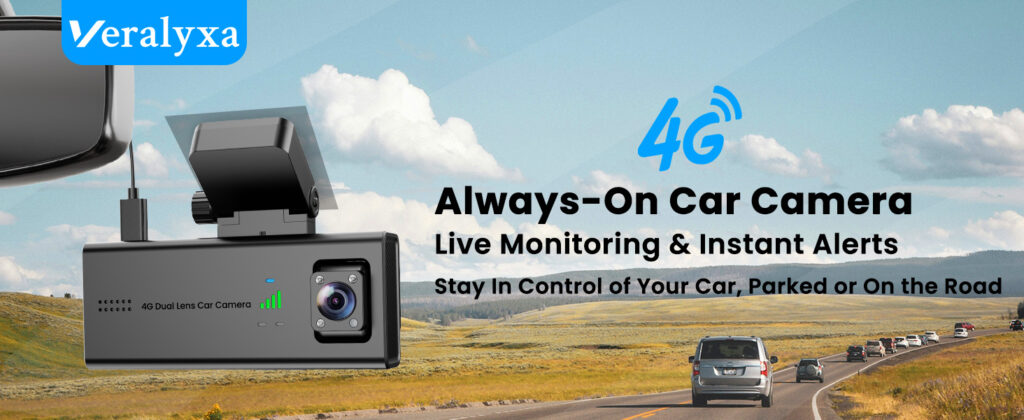
One example that fits this setup well:
👉 Veralyxa 4G Car Camera (check exact model, current cost and service)
- ✔ Works without WiFi (true remote monitoring)
- ✔ Test detection and notification delivery with the actual network and settings
- ✔ Compact and easy to position inside a car
- ✔ Verify parked-state power, coverage and saved clips at your location
✔ Check the exact model, supported service and parked-state power
💡 Other Options Depending on Your Needs
These are additional candidates to check, not a measured popularity ranking:
- 👉 FocuWay — check exact-model network compatibility; comparative signal strength is unverified
- 👉 Volam — compare the current total equipment and service cost
🔎 Want to Compare More Documented Options?
See model-specific guides, setup requirements and documented limitations:
👉 See Cameras That Actually Work →❓ Frequently Asked Questions About Monitoring a Parked Car
Here are the most common questions people have when trying to monitor their car effectively:
Can I monitor my car without WiFi?
A compatible cellular camera can support remote access without site WiFi; supported local dash-cam recording is another outcome. A fixed WiFi camera can remain remotely accessible after you leave. A camera that moves beyond its access point loses that connection, though supported local recording may continue.
→ Learn how cameras work without WiFi
What is the best camera for a parked car overnight?
For saved evidence, compare supported parking-mode dash cams and their power systems. For remote access, verify cellular or fixed WiFi coverage and exact-model features; 4G alone does not guarantee continuous recording.
→ See best cameras for overnight parking
Do dash cams work for monitoring parked cars?
Dash cams with supported parking mode can record parked incidents when correctly powered. Remote access and alerts require a connected model, suitable network and any required service; local footage remains useful evidence.
→ Learn about dash cam limitations overnight
Do 4G car cameras require a subscription?
In most cases, yes — but usually only for the SIM data plan, not for the camera itself. Compare current service quotes and one-year/three-year ownership costs.
→ See real 4G camera subscription costs
Where should I place a camera inside my car?
The best position is high and facing outward, so it can capture activity around the vehicle rather than just inside it.
→ See proper camera placement guide
💡 Final Insight
Monitoring a parked car isn’t about buying the most expensive camera.
👉 It’s about choosing a setup that actually works in your real situation
If you want a setup that actually works:
👉 See Cameras That Actually Work →Disclosure: As an Amazon Associate, we earn from qualifying purchases. This comes at no extra cost to you. We only recommend products based on real use cases, research, and user feedback.
Pingback: How to Monitor Your Car Remotely Without WiFi (Real Solutions That Actually Work)
Pingback: 4G vs WiFi Security Cameras for Cars: What Actually Works in Real Life (2026 Guide)