By Smart Cam Guide. Research checked September 29, 2026. This is a document-based buying guide, not a hands-on test.
Disclosure: As an Amazon Associate I earn from qualifying purchases.
Blink Outdoor 4 can miss a second event while it is waiting to trigger again. Blink’s retrigger time is an adjustable 10–60 second interval after a motion clip ends. Blink says the camera does not record motion events during that interval. Shortening it can reduce the gap, but it does not turn Outdoor 4 into a continuous-recording camera.
What retrigger time actually means
Think of retrigger time as a pause between event clips. It is separate from how long a clip can run and from how quickly a notification arrives on your phone. If someone walks into view during that pause and leaves before the camera can trigger again, a shorter previous clip or a fast push notification cannot reconstruct the missing footage.
The setting is applied per camera. For Outdoor 4, Blink’s device settings describe a motion clip length of 5–60 seconds and a retrigger interval of 10–60 seconds. These are configurable limits, not a promise that every clip lasts the selected maximum or that every person produces a clip.
A worked example: the second visitor
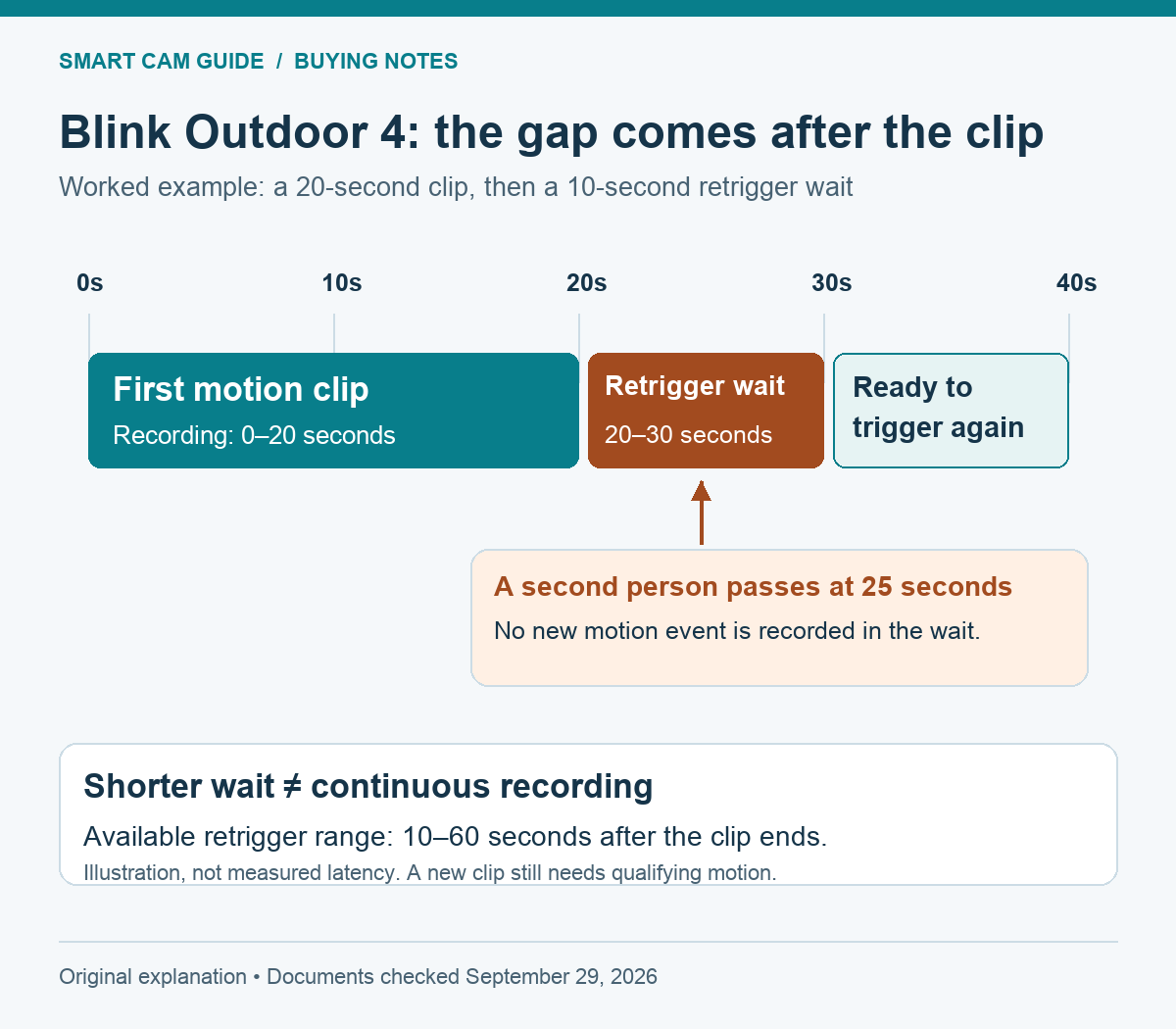
Suppose a delivery starts a clip at 0 seconds and that clip ends at 20 seconds. With a 10-second retrigger setting, the camera waits from second 20 to second 30 before it can trigger again. A second person who crosses the entrance entirely inside that interval may have no recorded event.
At second 30, the wait has ended; the camera still needs a qualifying motion event. Do not read the diagram as a guarantee that another clip starts at exactly that instant. Motion direction, detection settings and what is actually in view still matter.
If an early-ending setting stops the first clip at second 8 instead, the retrigger wait follows that actual ending. If the first clip runs longer, the wait starts later. The key reference point is when the clip ends, not when the first alert reaches your phone.
Four settings that are easy to confuse
| Control or behavior | What it changes | What it does not establish |
|---|---|---|
| Clip length | The maximum duration selected for a motion recording | Uninterrupted recording between separate events. |
| Retrigger time | The 10–60 second wait after a clip ends | A notification-only delay; motion is not recorded in this window. |
| End clip early | Can finish the recording when motion stops, before the maximum length | A guaranteed full-length clip for every trigger. |
| Early notification | Can send an alert before the event clip has finished | Proof that the completed clip is already available, or removal of the retrigger gap. |
On a phone, swipe the table sideways to see every column.
Blink lists Early Notification as always on for Outdoor 4. It is therefore a poor explanation for a missing second event by itself: early notification concerns when you are alerted, while retrigger time concerns whether a new event is recorded. First establish which of those two problems you are seeing.
How to check a busy entrance
Start with the camera armed, motion detection enabled and a working way to save clips. In the individual camera settings, note the current clip length, retrigger time and early-ending choice before changing anything. App labels and screen grouping can change, so look for the named controls rather than assuming a fixed sequence of taps.
For a busy entrance, the 10-second retrigger setting is a useful starting point if your aim is to reduce the documented wait. Then choose a clip length that can cover the approach you care about, rather than maximizing every setting automatically. More frequent or longer recordings can cost battery life; do not assume the advertised battery-life figure applies to a busy doorway.
Make two deliberate passes through the view and compare the saved clip timestamps. First leave a wide gap, then try a second pass soon after the first clip ends. Check playback, not just notifications. Repeat with the path people actually take: Blink’s motion guidance says Outdoor 4 uses passive infrared detection, and crossing the view is easier to detect than moving directly toward the camera.
If a single approach is missed even when the camera has been idle well beyond the retrigger period, investigate motion settings, placement and the saving path as well. A retrigger explanation only fits an event that falls into that timing window. Our Outdoor 4 add-on and Sync Module Core buying guide separates camera compatibility from the module and storage you need.
When Outdoor 4 is the right purchase
Outdoor 4 fits a buyer who values battery placement flexibility and accepts event clips with gaps. It is a weaker fit for a doorway where several people arrive close together and every second between them matters. If uninterrupted evidence is the requirement, start with a powered camera that explicitly supports continuous recording and a suitable storage plan. Our Tapo C120 recorder options explain a powered-camera route, including its separate compatibility limits.
The current Amazon bundle we checked combines Outdoor 4, a new Battery Doorbell 2K+ in black and Sync Module Core. Consider it only if you also need that doorbell and accept the bundle’s storage path. Sync Module Core does not provide local recording storage; saving cloud clips depends on an eligible subscription or trial. The bundle does not eliminate the Outdoor 4 retrigger gap.
Check the Outdoor 4 + 2K+ Doorbell + Core bundle
Already own a compatible Blink system and only need one more Outdoor 4? Compare an add-on camera instead of buying an unnecessary doorbell and module. The link above is the specific bundle we verified, not an add-on-only camera. Bundle contents, availability and price can change; check the selected configuration before ordering.
What we verified
We checked Blink’s Retrigger Time article, Device Settings reference, Understanding Motion Detection guidance and Sync Module requirements, then verified the selected US Amazon bundle. The camera appeared on the relevant Amazon Best Sellers list; that supported considering it, not recommending it for every entrance.
We have not measured Outdoor 4 latency, tested battery life or performed a physical walk test for this article. The timeline is a worked example of the documented settings. The buying decision follows from the recording gap: adjust it when event coverage is sufficient; choose another recording approach when continuous coverage is essential.
A missing moment in a saved clip and a notification without a picture are different problems. If the clip exists but your phone alert has no image, use our Blink notification image-preview checklist to check the exact camera, storage arrangement and notification timing before changing retrigger settings.