By Smart Cam Guide. Research checked September 25, 2026. This is a document-based guide, not a hands-on test.
Affiliate disclosure: As an Amazon Associate I earn from qualifying purchases.
No. Blink Mini Pan-Tilt does not automatically follow detected movement. It lets you move a first-generation Blink Mini remotely in Live View. A motion alert, a manually started room sweep and automatic subject tracking are different features. Buying the motorized mount does not add tracking.
It can suit someone who opens the app to look around a room. It is a poor match for someone expecting the camera to keep a moving pet centered while nobody is operating it, or to watch two separated doorways continuously with one lens.
What moves automatically, and what does not?
| Feature | What to expect |
|---|---|
| Manual pan and tilt | Use directional controls during Live View. You decide where it points. |
| A room sweep you start | The mount scans across its range after you select the pan option. That is not subject tracking. |
| Motion detection | An alert does not make the mount turn to follow the subject. |
| Scheduled patrol | Blink says the mount cannot be scheduled to pan and tilt. |
| Calibration | Movement during setup or after power loss can be calibration rather than a detected person. |
For example, imagine the camera faces a doorway and your dog walks behind the sofa. A remotely movable lens may let you look toward the sofa when you open the app. It does not establish that the camera followed the dog there, saved the whole journey or captured an event outside its current view.
Set a useful default view, then return to it
Choose the view that matters when you are not actively looking around: perhaps the entry into the room rather than the spot where a pet is sleeping. In Live View, point the camera there, open More and update the Default View. The saved view gives you a known position to return to after manual movement.
Blink’s support pages describe the sweep’s return behavior differently: the FAQ names the default position, while the controls page describes returning to the starting position. We would not base coverage on an assumed automatic return. After a sweep or manual pan, use the saved Default View control and confirm the image shows your intended doorway.
Activity Zones move with the frame
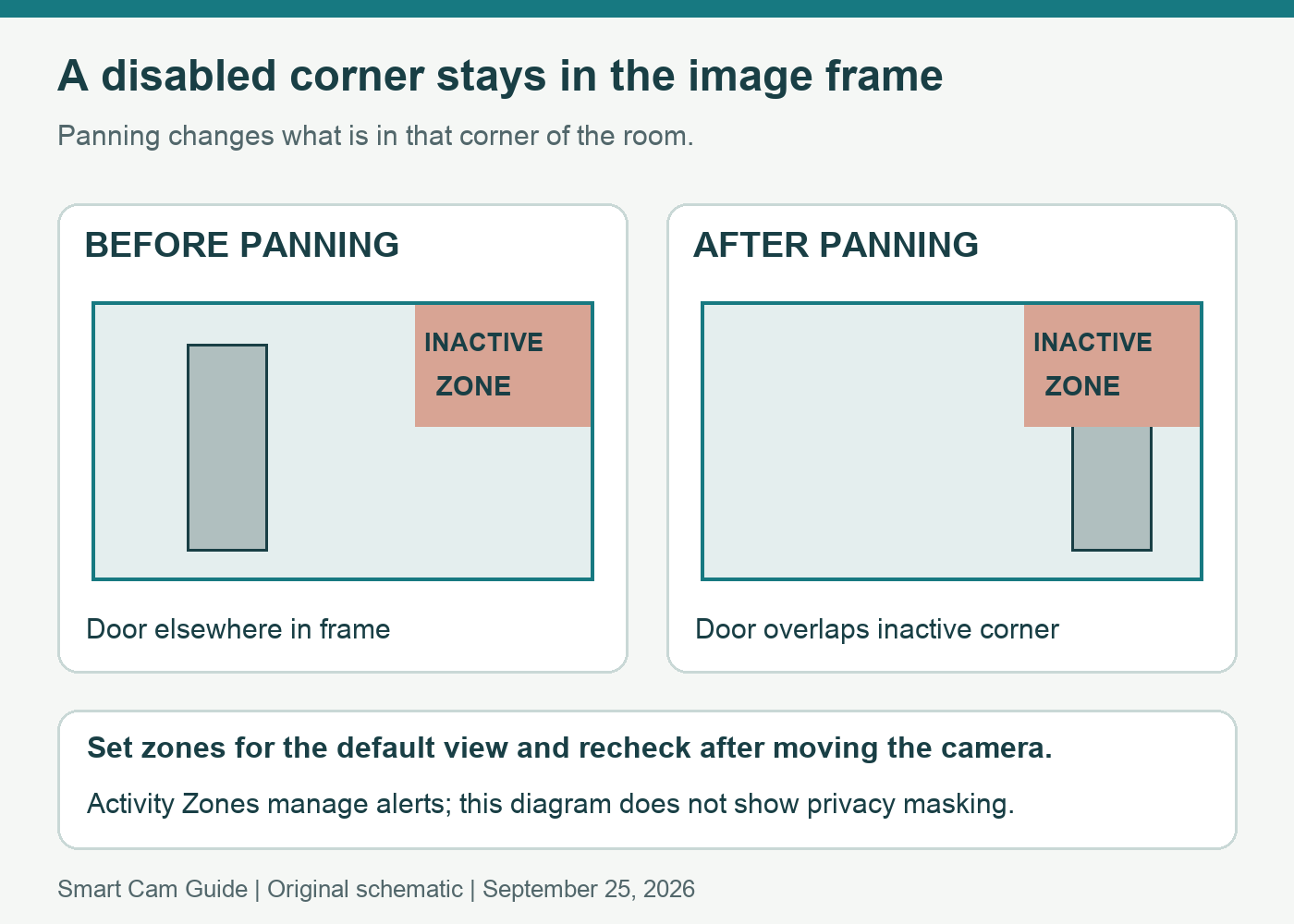
Blink explains that an inactive Activity Zone remains in the same part of the image as the camera turns. It is not pinned to a physical object in the room. If the upper-right corner was disabled to avoid a moving curtain, that same corner remains disabled after the view changes—even when it now contains part of a doorway.
This makes your default viewpoint important. Set zones for the view you intend to leave the camera in, return to that view after looking around, and check alerts with a walk through the actual entrance. Recheck after moving the base or changing furniture. Activity Zones are an alert-management feature; do not assume they hide private areas in every view.
Check the camera generation before ordering
The mount is designed for Blink Mini, first generation. Blink says Mini 2 is incompatible; the Mini 2K+ FAQ separately confirms that the mount is not supported on that model either. A similar product name or an adapter for a different connector does not establish compatibility.
The selected white Mini Pan-Tilt bundle includes the compatible camera and mount. A standalone mount is a different purchase and does not include a new USB cable or power adapter. Confirm the contents of the selected package; someone who already owns a compatible first-generation Mini may not need another camera.
Check the white Blink Mini Pan-Tilt bundle
This is an indoor, plug-in setup. Keep its movement path clear and use the supplied compatible power equipment. Do not treat it as an outdoor battery camera. Alexa access to the Mini’s normal live view also should not be mistaken for Alexa control of the mount’s movement.
When a different setup makes more sense
- You want occasional remote looks around one room: Mini Pan-Tilt is a candidate if you are comfortable steering it yourself.
- You need evidence from two rooms at once: separate fixed views address the coverage problem more directly. See our two-camera recording and room-planning guide for the planning tradeoffs.
- You already bought a Mini 2K+: do not buy this mount to add movement. Our Mini 2K+ storage and Sync Module guide covers that camera’s separate system requirements.
- Automatic tracking is essential: leave this bundle off the shortlist. Verify tracking, recording and subscription conditions for the exact alternative model before buying.
Finally, decide whether you need live check-ins or recordings you can replay later. The mount changes where the camera points; it does not settle the camera’s recording-plan or storage requirements. Check those for your account and exact camera, and test the resulting saved clips before relying on them.
Research scope: Blink Pan-Tilt Mount FAQ, Pan-Tilt Features and Controls, Mini 2K+ FAQ, and the exact white US bundle listing, checked September 25, 2026. We have not tested tracking, alerts or recording performance in a home.
If an alert arrives without a picture, check Blink image-notification model, storage and timing conditions. A Pan-Tilt mount does not add previews or change the camera’s storage eligibility.