By Smart Cam Guide. Document-based buying guidance; checked September 20, 2026. We have not hands-on tested these products.
Affiliate disclosure: As an Amazon Associate I earn from qualifying purchases.
The Ring Indoor Cam 2K offers a higher stated resolution, but its lens cover does not perform the same audio shutoff as the Indoor Cam 2nd Gen cover. On the 2K model, closing the cover obstructs the view and muffles sound; use the Ring app’s microphone control for full audio privacy. If your household relies on one physical cover movement to stop camera and microphone activity, understand that change before upgrading.
This is a model-specific comparison. Retail words such as “newest” are not enough to identify which privacy behavior you are buying.
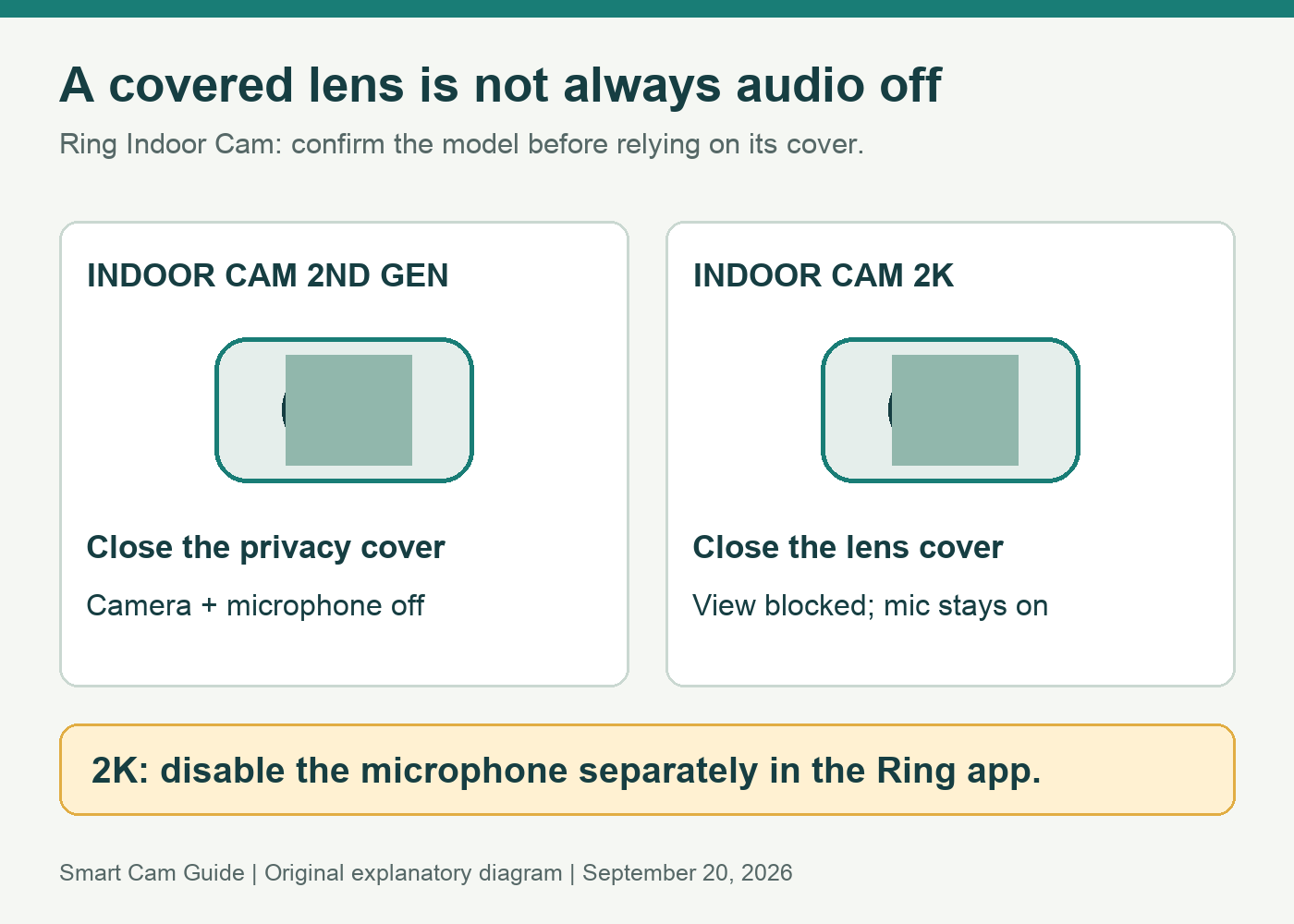
The two differences to check first
- Image resolution: Indoor Cam 2nd Gen is a 1080p model; Ring specifies 2560 × 1440 for Indoor Cam 2K.
- Cover behavior: Ring describes the 2nd Gen privacy cover as turning the camera and microphone off. Its 2K lens cover blocks the lens and muffles the microphone; microphone disabling is a separate app action.
Ring also says Indoor Cam Plus was renamed Indoor Cam 2K without changing its features. Check the full product name and specification, especially if older packaging or a retailer’s page still uses “Plus.”
View Ring Indoor Cam 2K two-pack on Amazon
The linked offer is the white two-pack. Compare its total package price with other two-camera offers; do not mistake it for a single camera or a 2nd Gen pack.
What the cover difference means at home
Imagine a living room camera used while the house is empty. When someone comes home, they close its cover and expect a private room. With the 2K model, the household routine needs an additional microphone check. A person who only sees a covered lens should not have to guess what the audio setting is.
Agree on a simple procedure with everyone who uses the room: identify the exact camera, decide when audio should be disabled and check that device’s setting. Do this separately for both cameras in a two-pack. Renaming them by room helps avoid changing the hallway camera while assuming the living-room camera was changed.
If you already own the older model, our Indoor Cam 2nd Gen cover guide covers its behavior. Keep those instructions attached to that model rather than applying them automatically to the 2K version.
Higher resolution is a reason to test, not a guaranteed result
A larger image can be useful when the existing view does not show the detail you need. It does not by itself tell us how well either camera will identify a moving subject at your placement, with your lighting and network. We have not done a side-by-side image test.
Before replacing a working camera, define a practical target: seeing whether a pet is on the sofa, checking a doorway, or recognizing which part of a room triggered an event. If your current image already answers the question, higher resolution alone may not justify replacing it.
If you do buy the 2K model, evaluate the normal installed view before deciding to keep it. Check the nearest and farthest relevant locations, ordinary evening lighting and a person moving through the scene. Avoid judging only a brightly lit, motionless object close to the lens.
A new camera does not remove the recording decision
Ring offers live viewing and real-time notifications without a paid plan, but reviewing missed events and saving footage require a compatible paid recording plan after any applicable trial. Do not treat a resolution upgrade as a subscription-free archive upgrade.
Make two separate acceptance checks: “Can I see what is happening now?” and “Can I retrieve the event after I leave the app?” The second is the one that exposes a mismatch between what you bought and what you expected to keep.
If local recording is your priority, our Kasa EC70 versus Ring Indoor Cam comparison explains a different storage tradeoff. Choose storage requirements before deciding whether extra pixels are the most important improvement.
Who should upgrade?
Consider the 2K model if you need another indoor view or have a specific detail problem worth evaluating, accept the recording-plan requirements, and can use a separate microphone control when privacy is needed.
Keep a working 2nd Gen if it already answers your monitoring question and its physical camera-and-microphone shutoff fits the way your household uses the room. We do not recommend replacing it simply because a listing calls another model newer.
For either camera, placement still matters. A camera facing a window can produce misleading nighttime results; our window reflections guide helps decide whether that view is suitable before you spend on another indoor model.
Before paying for a two-pack
- Confirm the listing says Indoor Cam 2K, with the intended color and camera count.
- Choose two useful indoor locations and plan power access for each.
- Agree on the separate lens-cover and microphone privacy routine.
- Confirm the recording plan you intend to keep after a trial.
- Test the actual view and saved-event workflow before treating either room as covered.
Check the white Indoor Cam 2K two-pack
Research basis: Ring’s Indoor Cam 2K product specification and FAQ, Indoor Cam 2nd Gen privacy-cover documentation, and the US Amazon two-pack checked September 20, 2026. We have not measured image quality, audio attenuation or detection accuracy.
Before choosing a resolution upgrade, identify what kind of history you need. Our Ring snapshots versus recorded video guide explains why a timeline of still photos can leave gaps, why snapshots may upload later, and when continuous recording is a separate requirement.