
If you’re trying to protect your car, this is the question almost everyone asks:
👉 Should you choose a 4G camera or a WiFi camera?
At first glance, they look almost identical.
- ✔ Both connect to mobile apps
- ✔ Both claim “remote viewing”
- ✔ Both promise security and monitoring
But the moment your car is actually parked — especially overnight — that similarity disappears.
🚗 Your car is parked on the street
🌙 It’s late at night
📱 You’re inside your home
Now here’s the only question that actually matters:
👉 Can you see what’s happening to your car right now?
💡 The Reality Most People Discover Too Late
WiFi cameras only work when they are connected to your network.
The moment your car is outside that range —
👉 They stop working completely
That’s why so many people say their camera “failed overnight.”
But in reality, the camera didn’t fail — it simply lost connection and stopped functioning.
👉 The real difference isn’t video quality
It’s whether your camera can stay connected when your car is unattended.
In this guide, we’ll break down:
- ✔ What actually happens when WiFi cameras lose connection
- ✔ Why 4G cameras work differently in real parking situations
- ✔ Which option actually fits your use case
If your goal is to monitor your car when you’re not there, start here:
👉 How to Monitor a Parked Car (Real Methods That Work) → 👉 Best Cameras for Overnight Car Monitoring →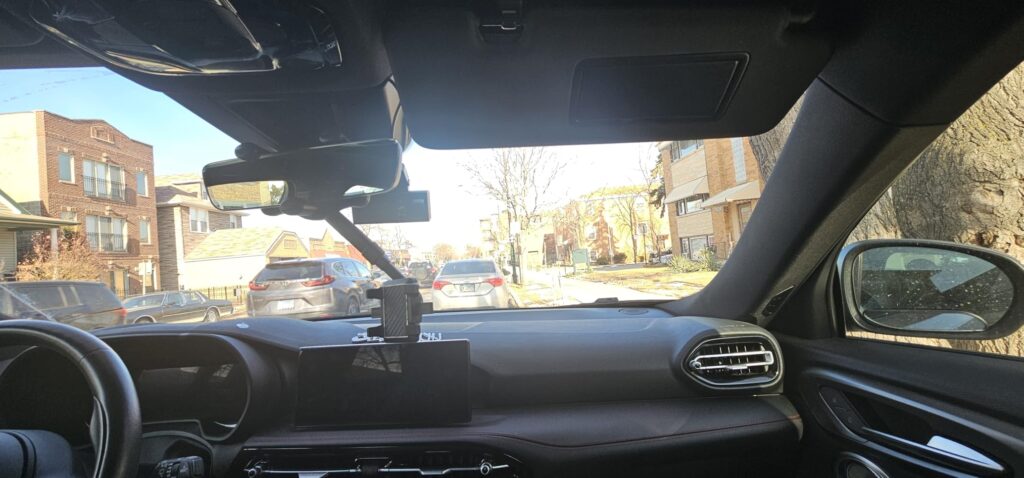
Real-world setup: a 4G camera working independently inside a parked car (no WiFi required)
This setup works because the camera doesn’t rely on your home network.
- ✔ Uses 4G mobile data instead of WiFi
- ✔ Sends alerts directly to your phone
- ✔ Lets you check live footage anytime
👉 This is the key difference most product listings don’t explain
Now compare that with a WiFi camera:
💡 Why WiFi Cameras Break Down for Car Monitoring
👉 The issue isn’t quality — it’s dependency
WiFi cameras are designed for homes, not parked cars.
They depend on a fixed network — which your car simply doesn’t have once it’s outside.
- ❌ Works only within WiFi range
- ❌ Disconnects silently when signal drops
- ❌ Cannot send alerts without internet
👉 This is a design limitation — not a product flaw
⚠️ What Actually Happens Overnight
In real parking situations, the failure looks like this:
- 🚗 You park and walk away → connection drops
- 📱 You check your phone → no live access
- 🔕 Motion happens → no alert is sent
- ⏱️ You discover it later → only partial or no evidence
👉 The camera didn’t “fail” — it just stopped being connected
📌 The Real Decision You’re Making
You’re not choosing between two camera types.
👉 You’re choosing between:
- A connected system that alerts you in real time
- A disconnected recorder you check after the fact
If you’ve experienced this before, here’s why it happens:
👉 Why Security Cameras Stop Working →So instead of comparing features…
👉 Let’s compare how 4G and WiFi actually perform in real use
⚖️ 4G vs WiFi Car Cameras — What Actually Works in Real Life
Instead of comparing features, let’s look at what really matters: Does it still work when your car is parked and you’re not there?
👉 This is not a small difference — it changes everything
WiFi cameras depend on your environment.
4G cameras work independently of it.
🚗 In a Real Parking Situation
- You park your car outside → WiFi disappears
- You walk away → camera disconnects
- Something happens → you receive nothing
👉 That’s the moment the difference becomes real
💡 What You’re Actually Choosing
You’re not choosing between two types of cameras.
👉 You’re choosing between:
- A system that alerts you in real time
- A system you check after something already happened
👉 Only one of these can actually protect your car
If you want to understand how real monitoring works without WiFi:
👉 How to Monitor Your Car Remotely Without WiFi →But this raises an important question:
👉 Why does WiFi fail so badly in car scenarios?
📡 Why WiFi Cameras Break Down in Car Monitoring
WiFi cameras are not flawed products.
They’re simply designed for a completely different environment.
👉 WiFi cameras are built for fixed locations
Homes, offices, indoor spaces — where the network never moves.
Car monitoring is the opposite: mobile, unpredictable, and often disconnected.
1. WiFi Is Designed for Short-Range Stability — Not Mobility
WiFi prioritizes speed and stability within a limited area — not long-distance coverage.
- ❌ Signal drops rapidly outside buildings
- ❌ Physical barriers weaken connection
- ❌ Outdoor coverage is inconsistent by design
2. WiFi Systems Are Location-Bound
Every WiFi camera is tied to a specific router — and that creates a hidden limitation.
- ❌ No router nearby → no system
- ❌ Changing location → connection breaks
- ❌ Public networks are unreliable for security use
👉 See how cameras actually work without WiFi →
3. No Connection = No Real Monitoring
This is where most expectations break.
- ✔ The camera may still record locally
- ❌ But remote access completely stops
- ❌ No alerts, no live view, no control
4. Real Parking Environments Don’t Match WiFi Conditions
Most cars are parked in environments where WiFi was never designed to work.
- 🚗 Street parking (no network infrastructure)
- 🏢 Apartment lots (weak or inconsistent signal)
- 🅿️ Public parking (no access to private networks)
💡 The Real Limitation of WiFi Cameras
WiFi cameras are built for environments where the connection is guaranteed.
👉 Car monitoring happens where connection is uncertain
And that mismatch is the root of the problem.
If you’ve experienced cameras “not recording anything,” this is usually why:
👉 Why Security Cameras Stop Working →So if WiFi cameras fail because they depend on a fixed network…
👉 What makes 4G cameras work in these exact same conditions?
📶 Why 4G Cameras Actually Work for Car Monitoring
If WiFi cameras fail because they depend on a fixed network…
👉 4G cameras work because they remove that dependency entirely
💡 The Key Difference
A 4G camera doesn’t rely on your location.
- ✔ No WiFi required
- ✔ No fixed router needed
- ✔ Uses cellular networks (like your phone)
👉 That’s what makes real remote monitoring possible
1. Connection That Moves With Your Car
Instead of relying on a fixed signal, 4G cameras use mobile networks — which are designed for moving devices.
- ✔ Works on streets and open parking
- ✔ Works in most apartment areas
- ✔ Works anywhere with cellular coverage
2. Alerts That Actually Reach You
A security system only works if it can notify you when something happens.
- ✔ Motion alerts sent instantly to your phone
- ✔ No dependency on local WiFi uptime
- ✔ Faster awareness of real events
3. True Remote Access (Not Limited by Location)
This is where most users immediately notice the difference.
- ✔ Open the app → access your camera instantly
- ✔ Check your car from anywhere
- ✔ No need to be near the vehicle
👉 See how remote car monitoring actually works →
4. Designed for Real-World Parking Conditions
Unlike WiFi systems, 4G cameras are built for environments where connectivity is uncertain.
- ✔ Outdoor and mobile scenarios
- ✔ No dependency on infrastructure
- ✔ Matches how cars are actually used
💡 Why 4G Becomes the Reliable Choice
WiFi cameras rely on a stable environment.
👉 4G cameras work even when the environment is unpredictable
That’s why they continue to function in the exact situations where monitoring matters most.
If you’re choosing a setup for real car use, this guide will help:
👉 Best 4G Cameras for Car Monitoring →But does that mean WiFi cameras are completely useless?
👉 Let’s look at when WiFi might still make sense
⚠️ When a WiFi Camera Can Still Work (And When It Can’t)
At this point, it might sound like WiFi cameras are a bad choice.
That’s not entirely true.
👉 In the right conditions, WiFi cameras work exactly as expected
The key is understanding whether your situation actually matches those conditions.
Because most car setups don’t.
1. Your Car Stays Within Reliable WiFi Range
If your parking situation is fixed and close to your home network, WiFi can be sufficient.
- ✔ Private driveway next to your house
- ✔ Garage with strong WiFi coverage
- ✔ Consistent signal where the car is parked
2. You Only Need Footage — Not Real-Time Alerts
If your goal is simply to review what happened later, a WiFi camera can still be useful.
- ✔ Recording events for later review
- ✔ No need for instant notifications
- ✔ No need to check remotely
3. Controlled Indoor Environments
WiFi cameras perform best in the environments they were designed for.
- ✔ Inside homes or garages
- ✔ Offices or private parking spaces
- ✔ Locations with stable, uninterrupted WiFi
📌 The One Question That Decides Everything
Instead of comparing features, ask yourself:
👉 Will your car still be monitored when you’re not nearby?
💡 The Real-World Decision
- ✔ If your car always stays within WiFi range → WiFi can work
- ✔ If your car is parked outside or unattended → WiFi becomes unreliable
👉 And that’s why most real-world car setups rely on 4G
If you want to see setups that actually work in these situations:
👉 Best 4G Cameras for Real Car Monitoring →So if 4G is the more reliable option in most cases…
👉 Which 4G camera setup should you actually choose?
✅ A Simple 4G Camera Setup That Actually Works (No WiFi Needed)
At this point, this is no longer about comparing specs.
👉 It’s about choosing a setup that still works when your car is parked and unattended
💡 What a real working setup looks like:
- ✔ 4G camera with SIM-based connection
- ✔ Real-time alerts sent to your phone
- ✔ Live viewing anytime, anywhere
- ✔ Proper placement inside your car
👉 This is the difference between “recording” and “real protection”
💰 Monthly Cost (What You Actually Pay)
All 4G cameras require a SIM data plan.
👉 Typical cost: $3 – $10/month
This is mobile data — not a hidden subscription fee.
🔥 Choose Based on Your Situation
👉 LAMTTO 4G Car Camera
If you want the most stable and reliable monitoring setup — this is the strongest option.
- ✔ Stronger 4G signal stability in real-world environments
- ✔ Reliable alerts with minimal delay
- ✔ Performs better in complex parking situations
- ✔ Designed for serious overnight monitoring
✔ Best choice for performance and reliability
💡 The Real Decision
You’re not choosing a camera.
👉 You’re choosing whether your camera actually works when you’re not there
👉 See All Tested 4G Camera Options →Real-world tested setups that actually work overnight
❓ Frequently Asked Questions (4G vs WiFi Car Cameras)
Still deciding which setup actually works for your car? These are the questions most people ask right before choosing.
Which is better for car monitoring: 4G or WiFi?
For real-world use, 4G cameras are significantly more reliable. They stay connected anywhere, while WiFi cameras only work within network range.
👉 If your car is parked outside your home, 4G is almost always the better choice
Can a WiFi camera monitor my car when I’m away?
No. WiFi cameras depend entirely on a local network. Once your car is out of range, remote access stops completely.
👉 This means no live view, no alerts, and no real monitoring
Do 4G car cameras require a subscription?
Yes — but it’s not a typical “subscription” in the way people expect.
You’re paying for mobile data (SIM plan), not the camera itself.
👉 Typical cost: $3–$10/month depending on usage
→ Full breakdown of 4G camera subscription costs →
Is a 4G camera worth it for a parked car?
If your car is parked on the street, in apartment lots, or any area without WiFi — yes.
👉 It’s often the only way to monitor your car in real time
Can I monitor my car overnight with a camera?
Yes — but only if your camera stays connected.
WiFi cameras usually fail overnight due to connection loss, while 4G cameras continue working normally.
→ Best cameras for overnight car monitoring →
💡 The Bottom Line
WiFi cameras are designed for convenience.
4G cameras are designed for reliability.
👉 And when your car is unattended, reliability is what actually matters
That’s the difference between checking footage later… and knowing what’s happening in real time.
Ready to choose a setup that actually works in real life?
👉 See Cameras That Actually Work →Tested in real parking scenarios — not just specs on paper
Disclosure: As an Amazon Associate, we earn from qualifying purchases. This comes at no extra cost to you. We only recommend products based on real use cases, research, and user feedback.
Pingback: Best 4G Car Camera for Street Parking (Real-World Test: What Actually Works Without WiFi)
Pingback: Do 4G Security Cameras Need a Subscription? Real Costs Explained for Car Use
Pingback: Best Camera for Parked Car Overnight (What Actually Works When You're Not There)
Pingback: Do Security Cameras Work Without WiFi? How They Work + What Actually Works in Real Life