As an Amazon Associate I earn from qualifying purchases. Purchases through our links may earn us a commission at no extra cost to you.
The eufy SoloCam S340 is worth considering when you can give its solar panel direct sunlight while placing the camera where it has a useful view. Those may be two different spots. Its removable panel and extension-cable arrangement are particularly useful when an eave shades the camera position.
This guide covers the selected single-camera SoloCam S340 package. It draws on eufy’s product FAQ and installation guidance checked September 19, 2026. We have not installed it or measured charging, winter endurance or detection reliability.
Plan two locations before drilling
First choose the view: the entrance, path or part of the yard where an event should be recorded. Check the connection at that position and make sure normal approach routes are visible. Then look for an exposed position for the panel within the supplied cable’s usable reach.
eufy’s panel-specific guidance recommends positions such as an exposed wall, pole or fence. It advises against putting the panel indoors, on a covered porch, beneath an eave or behind shade from trees. A bright-looking space can still lack the direct sunlight the panel needs.
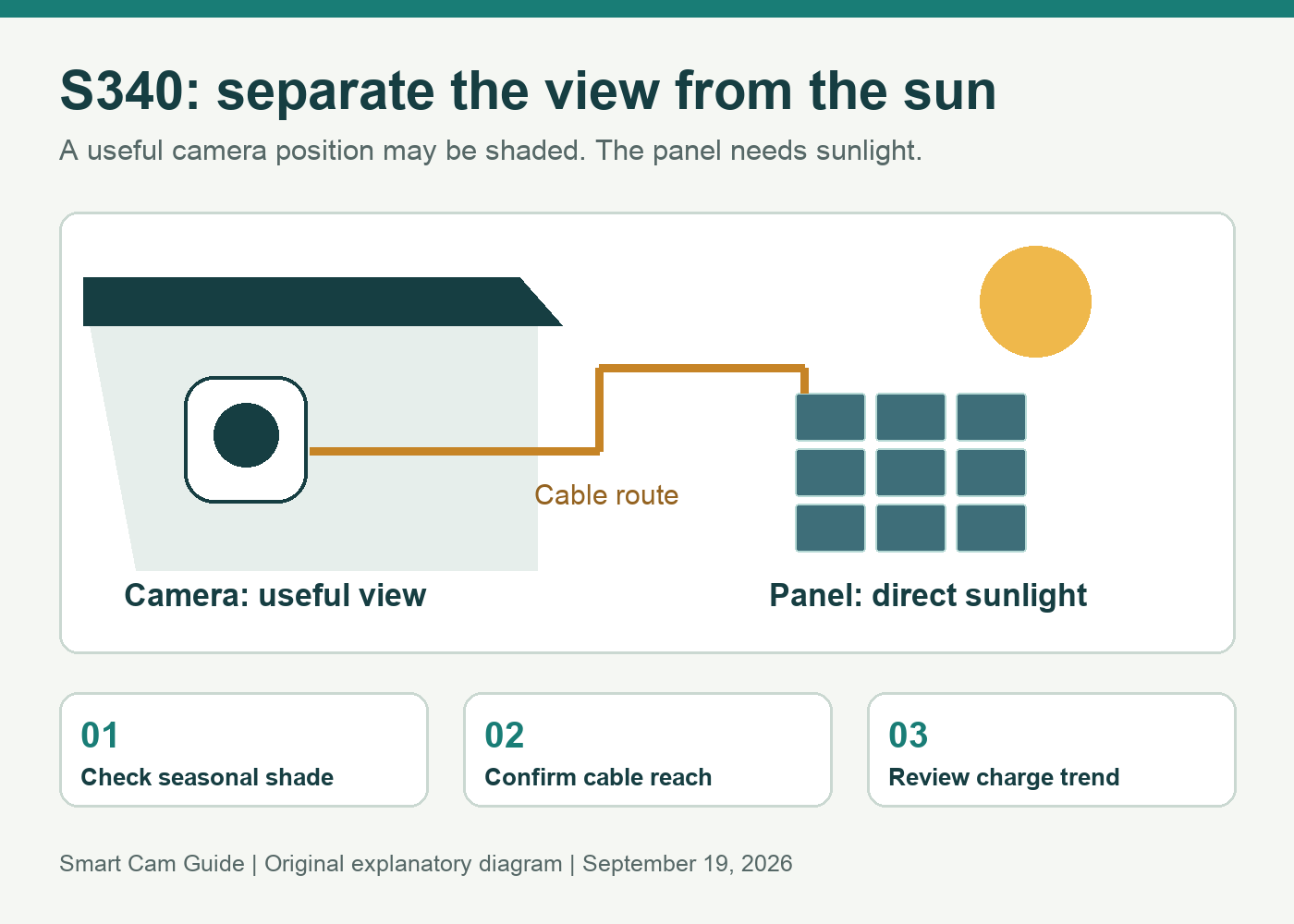
If the panel stays attached directly to the camera, both jobs must work in the same place. If you separate them, both mounts and the connecting cable become part of the project. A sunny patch several feet away is only useful if you can route the cable safely without stretching it or leaving connectors exposed contrary to the instructions.
Use sunlight hours as a planning condition
The retail product page describes two hours of direct sunlight under its stated assumptions. eufy’s installation advice is more conservative, recommending three to four hours. These are not interchangeable guarantees for a shaded house, a busy driveway or winter weather.
Visit the proposed panel location at several times of day. Watch the eave’s shadow, nearby buildings and trees. Consider whether seasonal sun angles could put the panel in shade. Use the more conservative installation guidance for planning, then check the actual charging trend after setup.
| Location | Decision before buying |
|---|---|
| Camera under an eave; panel can reach open sunlight | A separate panel mount may make the setup workable. |
| Panel must remain under the same shaded eave | Choose another position or a different power arrangement. |
| Sunny mount but no usable camera connection | Fix the connection plan first; solar power does not solve it. |
| Frequent events or long viewing sessions | Allow for higher energy use; do not assume a fixed battery duration. |
eufy SoloCam S340 — single-camera solar package
Check price on AmazonSeparate charging from continuous recording
S340 does not provide a continuous 24/7 recording timeline. Its model-specific FAQ explicitly says it does not support 24/7 recording, including when connected to HomeBase 3. Keeping a battery charged is a power question; saving every moment is a recording question.
The same FAQ bases its three-month battery estimate on 300 seconds of recording per day and notes that event frequency, recording duration and temperature affect it. Treat that as the manufacturer’s test assumption. It is not a prediction that your installation can be ignored for three months.
Choose another camera if you need to review an arbitrary minute between detected events. Our wired outdoor camera setup guide explains the different power and installation checks involved in an alternative arrangement.
Confirm the installation in the app and on the property
- Check the view before fixing the mount. eufy’s S340 advice recommends a camera height of 7–10 feet. Confirm the intended approach is visible rather than hidden by the mounting wall or vegetation.
- Connect the panel as instructed. Use the supplied connection method, secure the cable connection and allow enough routing slack. Do not assume an arbitrary extension cable has equivalent outdoor protection.
- Open the solar charging dashboard. The manufacturer specifically points to this app check after installing the panel. Confirm that the setup is actually charging when the panel receives sun.
- Compare the battery trend across ordinary days. Note charge level at a consistent time alongside sunshine and activity. One sunny afternoon does not establish reliable operation through several cloudy days.
- Walk the intended route and review the saved event. Confirm the view and timestamp in playback. This is an acceptance check for the owner, not an event we claim to have tested.
A falling battery trend should prompt a check of shade, cable connection, weather and activity before assuming the camera is defective. Keep the panel accessible for the maintenance required by its instructions. Do not rely on a difficult-to-reach mounting point simply because the marketing suggests permanent solar power.
Who should shortlist this package?
The single-camera S340 suits a buyer who wants a movable view and event recording, can supply a working connection at the camera, and has a practical sunny panel location. The ability to separate the panel from the view is the reason to consider it for a shaded wall.
Pass if the only panel position is persistently shaded, if the cable cannot be routed appropriately, or if continuous footage is essential. Also plan the framing: a rotating camera still looks in one direction at a time. For the broader limits of looking around versus holding a default view, see our pan-and-tilt placement explanation.
SoloCam S340 — verify single-camera contents and panel route
Check price on AmazonSources and scope: eufy SoloCam S340 product FAQ; S340/E30 Solar Panel Installation Recommendations; How to Connect the Solar Panel; S340 Outdoor Cam Installation Advice; selected Amazon US Solo Cam variant. Checked September 19, 2026. Sunlight guidance varies by document; no winter-runtime, license-plate or continuous-recording performance is claimed.
After planning solar placement, compare SoloCam S340 standalone storage with the HomeBase 3 upgrade. More storage can help retention, but it does not solve charging problems or enable continuous recording on this camera.