As an Amazon Associate I earn from qualifying purchases. Purchases through our links may earn us a commission at no extra cost to you.
Give Ring Pan-Tilt Indoor Cam an unobstructed place to rotate, then set its Home Position toward the view you most need when you are not actively looking around. A motorized 360-degree pan range does not put every direction into one video frame. A cramped bookshelf can also defeat the reason for choosing a rotating camera.
This guide covers the US Ring Pan-Tilt Indoor Cam introduced in 2024, using Ring’s current product specifications and control instructions reviewed September 18, 2026. The linked variant is one white camera, device only. We have not installed or tested it. This is a placement and setup guide, not a claim about detection accuracy.
360-degree movement is not simultaneous coverage
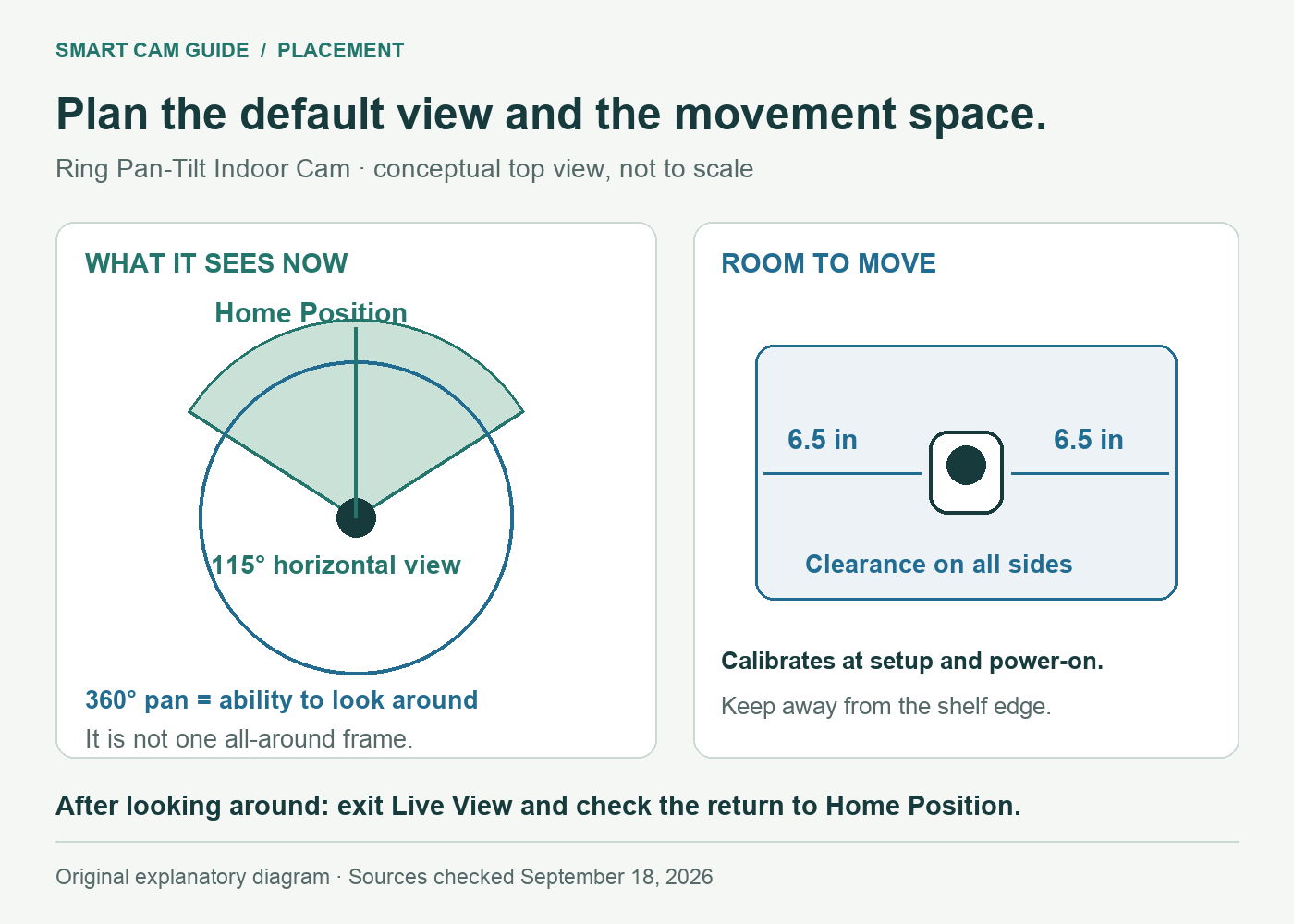
Ring specifies a 115-degree horizontal field of view, 59-degree vertical field of view and 143-degree diagonal field of view. It separately lists 360-degree pan and 169-degree tilt coverage. The first numbers describe the lens’s view in a position; the second describe its ability to look around.
For placement, mark the doorway, floor area or other location that should remain in the default view. If two important areas sit in opposite directions, do not assume a single camera captures both at the same instant just because it can rotate toward either one. Furniture, doors and people can still block the line of sight.
Try the proposed location before fastening a mount. From Live View, look toward each area you care about and check whether a shelf edge, lamp or cabinet side hides part of it. Include the floor if pets are the reason for buying the camera; a high position that sees a doorway can still hide the space directly below it.
That check is about a usable picture, not merely whether the motor can point in the direction. For a camera aimed through glass, also consider reflections; our window and night-reflection guide explains why an indoor camera behind a window needs a different acceptance check.
Allow clearance for its automatic calibration
Ring’s operating instructions say the camera calibrates during initial setup and whenever it powers on. They call for 6.5 inches (16.5 cm) of clearance on all sides and a position away from the edge of a table or shelf. Keep nearby objects out of its path rather than checking only the forward-facing pose.
The camera itself measures 2.37 × 2.37 × 5.78 inches including its stand. Its small base therefore does not establish that a narrow shelf is an appropriate location. Plan the operating space around it, account for the cable and confirm the current instructions for the mounting orientation you select.
| Placement check | What to establish before mounting |
|---|---|
| Stable support | A suitable flat location or correctly installed wall/ceiling mount; keep the camera away from an exposed shelf edge. |
| Movement space | Ring specifies 6.5 inches of clearance on all sides; nearby objects must not obstruct calibration or rotation. |
| Useful sightline | Confirm the important area is visible, including low areas and corners you actually need. |
| Cable route | A reachable indoor outlet and a route that does not pull on the camera or interfere with movement. |
| Privacy control | Leave the manual cover accessible and explain its use to the people who share the room. |
A shelf crowded with books may offer the right height but the wrong operating space. Moving a few inches forward is not a sound fix if it places the camera at the shelf edge. Choose a larger clear surface or a suitable mount instead of relying on the camera squeezing between objects.
Ring Pan-Tilt Indoor Cam — white, one camera, device only
Check price on AmazonSet Home Position around the view that matters most
Ring calls the default view Home Position. Its operating guide says the camera returns there after you exit Live View. Choose it deliberately: a useful setting might show the entry to the room or the pet’s usual resting area, depending on your actual purpose.
- In the Ring app, select the camera under Devices.
- Open Device Settings, then General Settings, then Home Position, following the current app prompts.
- Allow the recalibration required when adjusting Home Position and keep the camera clear of obstacles.
- Open Live View and use Rotate controls to inspect another area. Ring describes tapping an arrow for a small movement and holding it for continued movement.
- Exit Live View, then reopen it to verify that the default view is the one you intended. Check after a later power cycle too.
These are owner acceptance steps based on the documented controls, not results from our own device. App layouts and available features can change. If a control is missing, use the current device-specific support instructions before relying on an older video tutorial.
Do not choose the default view solely because it looks tidy. A picture centered on an empty wall can be sharp yet unhelpful. Check the scene under the lighting in which you plan to use it and make sure the camera remains stable as it changes direction.
Include the outlet, network and saved-video plan
This is a plug-in indoor camera, not a rechargeable camera you can place anywhere without a power route. Ring lists a 10-foot USB-A to USB-C power cable and a 10 W power adapter. Measure the actual cable path along the furniture or wall, allowing for bends; the straight-line distance to the outlet can understate what you need.
The documented Wi-Fi connection is 2.4 GHz, with at least 2 Mbps upload speed required. Test the intended location’s connection during setup. A speed result next to the router does not establish the connection at a camera behind furniture or on another floor.
Live View is available without a subscription, but saved video history requires a compatible Ring plan. Decide whether checking the room live is enough or whether you need to review an event after it happened. Verify current plan eligibility and terms for the account; do not assume a camera-only package includes ongoing recording.
The built-in manual privacy cover disables audio and video when closed. Put it within practical reach if household members will use it. A camera mounted too high to reach easily may be a poor choice for a room where privacy needs change throughout the day.
When Pan-Tilt is worth the placement effort
It is a reasonable candidate when you want to look around a room from the app, have suitable open operating space and can set a useful default view. A smaller fixed-view camera may be simpler when one stable view already covers your needs. Our Kasa EC70 versus fixed Ring Indoor Cam comparison covers a different Ring model; keep that distinction clear when comparing prices and features.
Before ordering, check the shelf or mounting space, the cable route, the default scene and the need for saved history. Those four decisions tell you more about fit than the 360-degree label alone.
Ring Pan-Tilt Indoor Cam — confirm the rotating model and package
Check price on AmazonSources and scope: Ring Pan-Tilt Indoor Cam US product specifications and “How to use Pan-Tilt Indoor Cam” operating instructions; selected Amazon US white device-only variant. Reviewed September 18, 2026. We have not measured motion detection, image quality, noise or connection reliability. Follow current Ring installation and app instructions.