As an Amazon Associate I earn from qualifying purchases. Purchases through our links may earn us a commission at no extra cost to you.
A security camera behind a window can produce a useful daytime view and an unusable night recording. The first suspect is light reflected by the glass—not necessarily a faulty camera. Before buying a higher-resolution model, test the actual window after dark with the camera’s infrared and visible lights disabled where the model permits.
The Wyze Cam v4 is our conditional example because it offers infrared night vision and a spotlight, both of which matter to this placement. It is not a purpose-built window camera, and turning those lights off does not make it see in complete darkness. This is research and a test procedure for your location, not a claim that we tested your window or this camera through glass.
The camera can end up filming its own light
Infrared illumination helps a camera looking directly at a scene. Put glass in front of that illumination and some of the light can reflect toward the lens. A bright haze, white patch or a reflected camera body can overwhelm the view outside. TP-Link’s placement guidance specifically cautions about glass reflections and their effect on detection.
Visible light matters too. A lamp behind the camera, a television or the camera’s own spotlight may reflect in the window. Double glazing, screens, dirt and the viewing angle can add further obstacles. More pixels do not remove a reflection already dominating the image.
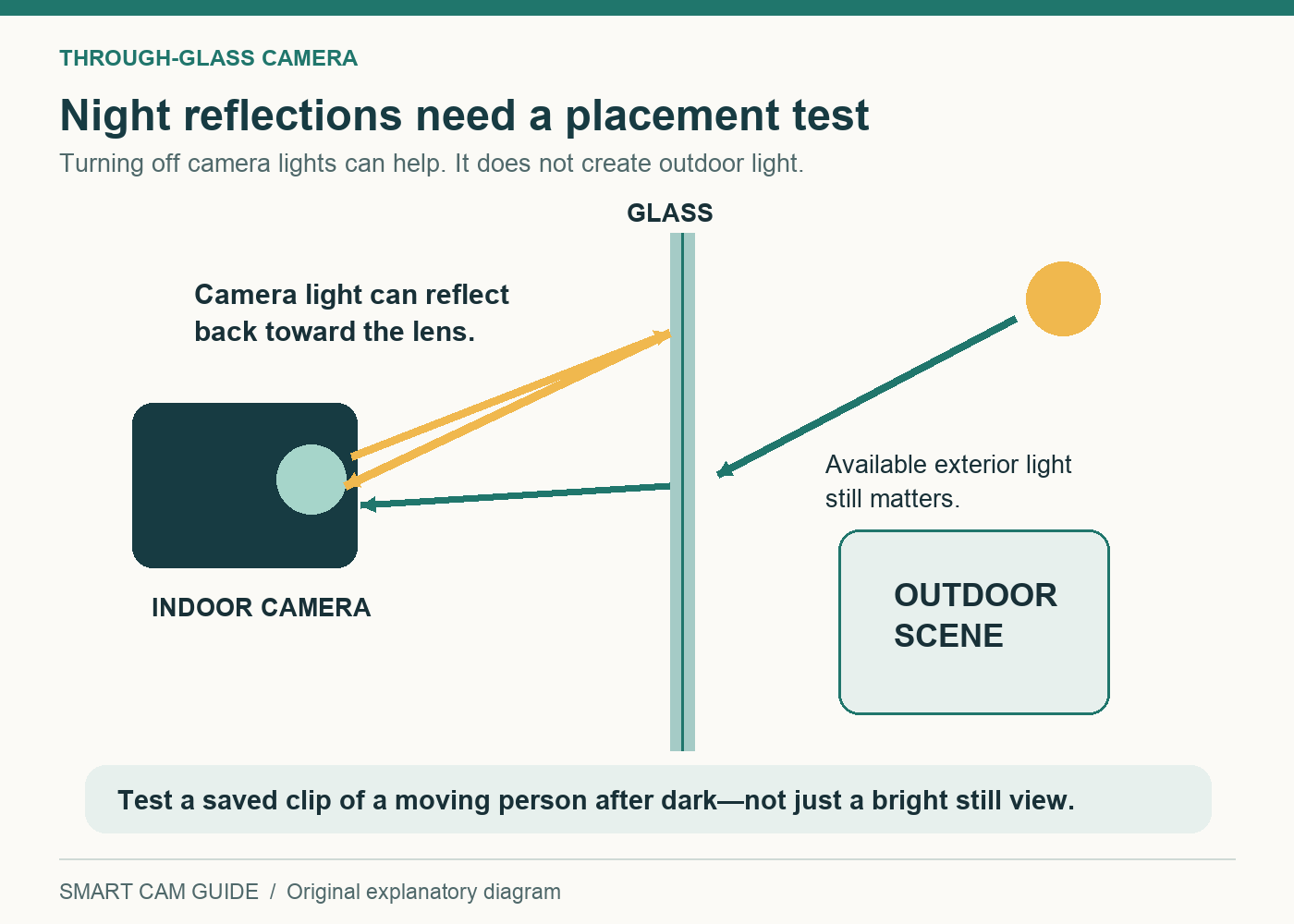
Detection is a separate question from image brightness. A camera may use image changes, object recognition or a separate motion sensor, depending on its design. Do not assume that every camera uses a passive infrared sensor, or that every detector behaves the same way through a window. Evaluate the actual camera’s recorded events at your location.
Run this test before committing to a window installation
- Choose the view. Frame the entrance or path you actually need. Avoid a wide view dominated by the room, sky or a neighbor’s window.
- Clean the relevant glass. Check the screen and both visible surfaces where safely accessible. Do not lean out or use an unsafe position to clean.
- Turn off camera illumination where supported. Disable infrared LEDs and the spotlight separately. A color-night setting and an infrared-light control are not necessarily the same switch.
- Reduce room reflections. Test with the normal evening lights on, then with them reduced. A setup that works only in a completely dark living room may not suit your routine.
- Record a moving person. With a household member’s cooperation, capture an ordinary approach along the relevant path after dark.
- Replay the saved clip. Check the face or event detail you need, not just a bright Live View. Confirm that the chosen recording mode saved the event.
Repeat the test with typical porch lighting and at a different time of night. A parked car under a streetlamp is an easier subject than a person walking through an unlit part of the frame. The right acceptance question is whether the recording answers your purpose, not whether the still image looks colorful.
| Symptom | First useful check | What not to conclude |
|---|---|---|
| A bright white patch after dark | Disable camera IR and inspect glass reflections. | That the sensor is defective. |
| A clear room reflected over the yard | Reduce interior light or change placement. | That higher resolution will remove the room. |
| The picture improves but people are blurred | Replay moving subjects under available exterior light. | That a bright static view proves useful identification. |
| Live View works but events are missed | Check recording mode, detection and the actual saved timeline. | That every alert or storage feature is included. |
| The scene goes dark with IR off | Assess a safely lit exterior view or a different mounting position. | That color night vision creates light from nothing. |
Where the Wyze Cam v4 fits—and where it does not
The Cam v4’s documented hardware includes 2560 × 1440 video, infrared illumination, a spotlight and 2.4 GHz Wi-Fi. Those specifications describe the camera; they do not certify an installation through your particular glazing. Consider it if you also have a useful direct-view placement available or can verify the window result during the return period.
We would not buy it solely on the assumption that its spotlight will improve a behind-glass night view. The spotlight can become another reflection source. If the only available location is behind dark glass with no useful exterior light, resolve that limitation before ordering.
Wyze Cam v4 — verify the placement before buying
Check price on AmazonThere is also a distinct Wyze Window Cam. Wyze describes that purpose-built model as having no infrared LEDs, no IR-cut filter and no spotlight, with a window-oriented mounting design. It is not the Cam v4 or the separate Wyze Window Mount accessory. We have not verified a Window Cam Amazon purchase variant for this guide, so the shopping links here lead only to the named Cam v4.
A mount can help position a compatible camera close to glass, but it does not supply missing outdoor light. Before buying any mount, verify its camera compatibility, window surface requirements and whether you can still open, clean and shade the window as needed.
Moving outdoors changes the power problem
A direct view can remove the window from the optical path, but moving a camera outside introduces exposure, cable routing and power-supply requirements. The Cam v4’s camera-body rating does not establish that every adapter, extension or connection is suitable outdoors. Our Cam v4 outdoor-power guide addresses that separate decision.
Also decide what recording you require. Being able to see a Live View does not prove that an important event will remain available tomorrow. For the Cam v4, read our subscription and local-recording guide before selecting the storage arrangement.
Keep a simple pass/fail record
Write down the placement, lighting, time and recording mode for each test. Give the setup a pass only if a saved clip shows the required event clearly enough and can be retrieved reliably. If it fails, change one variable at a time: room light, camera light, position or the exterior view. Replacing the camera before isolating the reflection can reproduce the same problem at a higher cost.
Keep the view limited to the area you intend to monitor, and check audio separately. A visual mask cannot be assumed to disable the microphone. If the location remains unreliable at night, choose a verified direct-view installation or a purpose-built alternative rather than treating an acceptable daytime picture as a complete security solution.
Wyze Cam v4 — check the exact camera and included power supply
Check price on AmazonSources: TP-Link camera-placement guidance; Wyze Cam v4 technical specifications; Wyze Window Cam versus Window Mount explanation; Wyze night-vision troubleshooting. Checked September 17, 2026. The test checklist is our planning guidance; no through-glass performance, facial identification or detection success is guaranteed.
For an empty property with no broadband, use our vacant-house coverage, power and response checklist before choosing a camera. A through-window view still needs a workable connection and someone who can restore an offline installation.